


MCP(Model Context Protocol)は、Anthropic社が2024年11月に発表し、オープンソース化したプロトコルです。大規模言語モデルと外部ツールやデータソースとの連携を実現することを目的としています。MCPを利用することで、ユーザーは大規模言語モデルの出力を手動でコピーして実行する必要がなく、モデルが直接ツールに指示を出して対応するアクションを実行させることができます。
OceanBase MCP Serverは、MCPプロトコルを通じて大規模言語モデルとOceanBaseデータベースの連携を提供し、SQL文を実行できるようにします。適切なクライアントを利用することでプロジェクトのプロトタイプを迅速に構築でき、GitHub上でオープンソースとして公開されています。
Kiroは、Amazon Web Services(AWS)がAI Agent専用に開発した統合開発環境(agentic IDE)です。これは人工知能機能を備えたプログラミングツールであり、開発者がコンセプト段階から本番デプロイまでの全プロセスを支援することを目的としています。
本記事では、Kiroを使用して、OceanBase MCP Serverを通じてバックエンドアプリケーションを迅速に構築する方法を紹介します。
前提条件
- 環境に利用可能なトランザクション型(MySQL)クラスタインスタンスがあります。
テナントの作成を参照してテナントの作成を完了した後、以下の手順を実行してください。
環境には、使用可能なMySQL互換モードのテナント、MySQLデータベース、およびデータベースアカウントが既に存在し、データベースアカウントに読み書き権限が付与されています。作成が必要な場合は、詳細についてはアカウントの作成およびデータベースの作成(MySQL専用)をご参照ください。
プロジェクト管理者またはインスタンス管理者として、プロジェクト内のインスタンスに対する読み書き操作を実行できる権限を持っています。権限がない場合は、組織管理者に連絡して権限の追加を依頼してください。
Python 3.11以降のバージョンと対応するpipをインストールしてください。マシンのPythonバージョンが低い場合は、Minicondaを使用して新しいPython 3.11以降の環境を作成できます。詳細についてはminicondaインストールガイドをご参照ください。
使用しているOSに応じて、Gitをインストールします。ご自身のOSに合わせて、ダウンロードしてインストールしてください:
Windows:https://git-scm.com/downloads/win。
macOS:https://git-scm.com/download/mac。
Linux:https://git-scm.com/downloads/linux。
Pythonパッケージマネージャuvをインストールします。
macOS/Linuxでは、独立したスクリプトを使用してインストールできます:
curl -LsSf https://astral.sh/uv/install.sh | shWindowsプラットフォームでは、以下のスクリプトを使用します:
irm https://astral.sh/uv/install.ps1 | iexまたは、プラットフォームに依存しないpipインストール方法を使用することもできます:
pip install uv
インストールが完了したら、
uv --versionコマンドを使用してインストールが成功したかどうか確認できます:pip install uv uv --versionKiroクライアント:
kiroのダウンロードページで、ご自身のOSに合ったバージョンを選択してインストールできます。
ステップ1:データベース接続情報を取得する
ドロップダウンリストから、ID **クラスタインスタンスを選択**します。
概要 ページに移動します。
接続をクリックし、接続文字列を取得 を選択します。
ポップアップウィンドウで、パブリックネットワークを使用 を選択します。
アクセスアドレスを取得し、現在のブラウザIPアドレスを追加 を選択します。
データベース関連情報を入力し、**接続文字列をコピー**します。
ステップ2:OceanBase MCP Serverの設定
OceanBase MCP Serverリポジトリのクローン
以下のコマンドを実行して、ソースコードをローカルにダウンロードします:
git clone https://github.com/oceanbase/awesome-oceanbase-mcp.git
ソースコードディレクトリに移動します:
cd awesome-oceanbase-mcp
依存関係のインストール
oceanbase_mcp_server ディレクトリで以下のコマンドを実行して仮想環境を作成し、依存関係をインストールします:
uv venv
source .venv/bin/activate
uv pip install .
KiroでOceanBase MCP Serverを設定
ショートカットキーCommand + L (MacOS)を使用してチャットダイアログを開き、左下または右上の歯車アイコンをクリックして、Kiro Settingsを選択します。
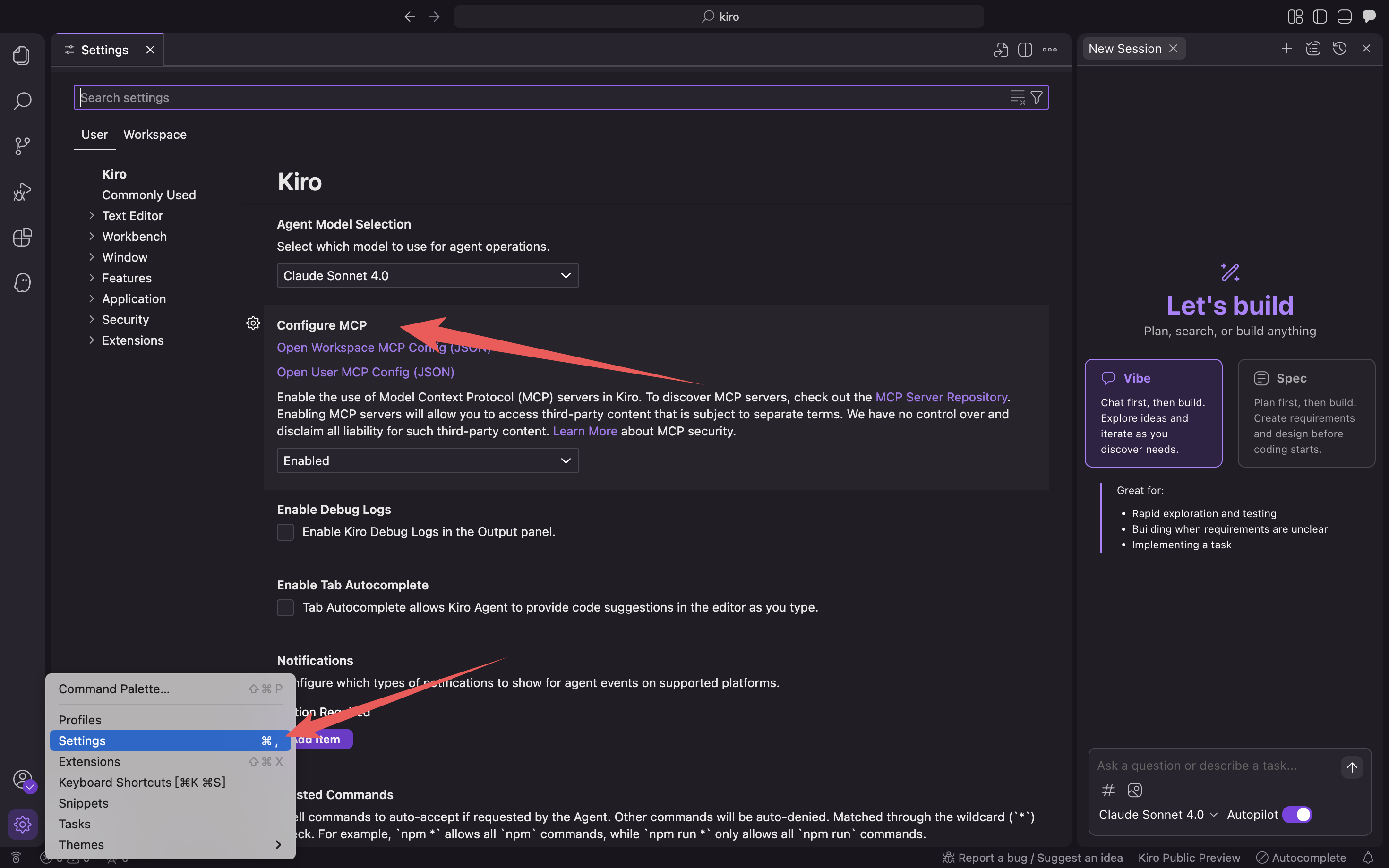
Open User MCP Config (JSON)/Open Workspace MCP Config (JSON)をクリックし、mcp設定ファイルに入力します。

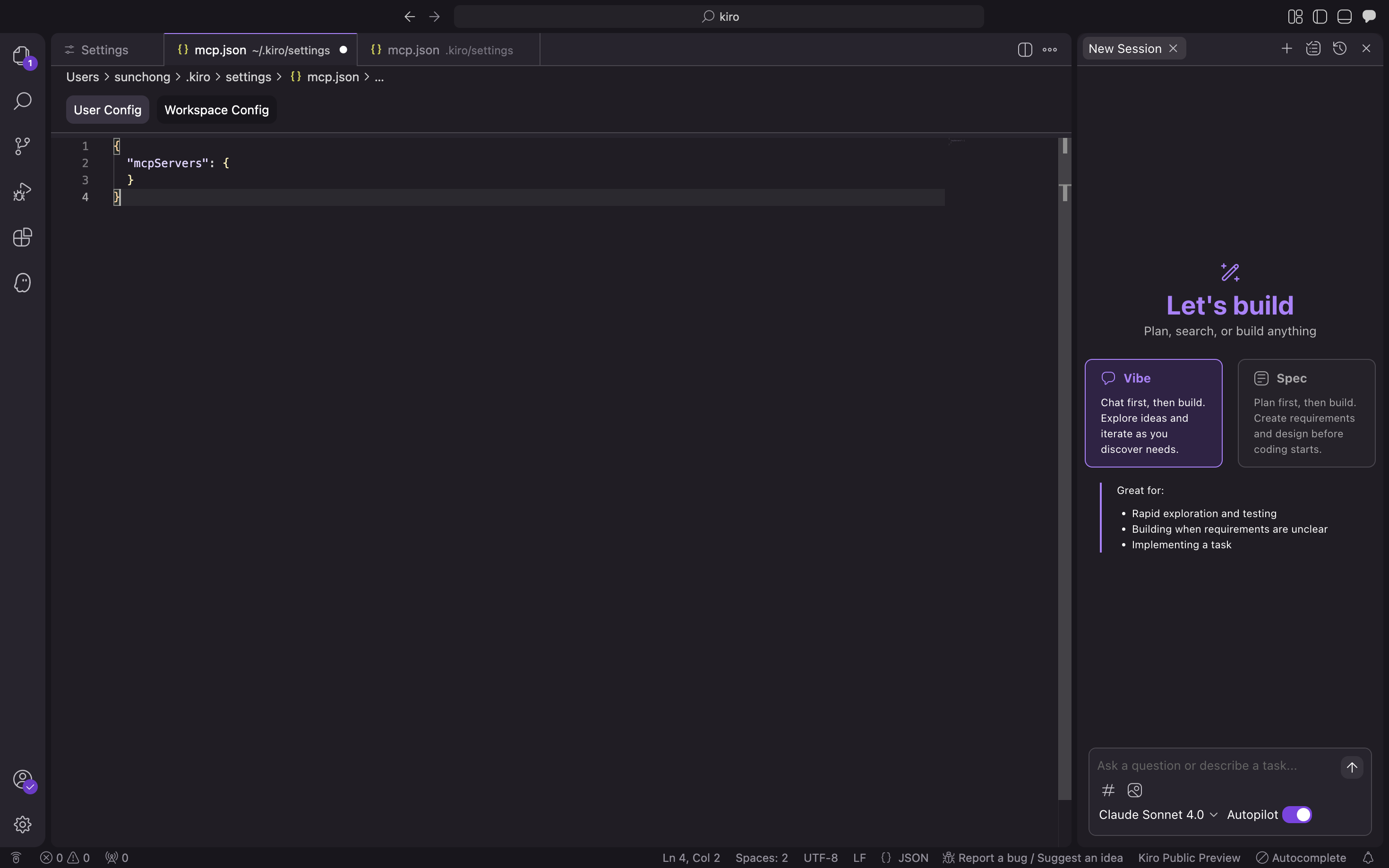
以下の設定ファイルに入力し、確認をクリックします。
/path/to/your/oceanbase_mcp_serverはoceanbase_mcp_serverフォルダの絶対パスに、OB_HOST、OB_PORT、OB_USER、OB_PASSWORD、OB_DATABASEはご自身のデータベースの対応する情報に置き換えてください:{ "mcpServers": { "oceanbase": { "command": "uv", "args": [ "--directory", "/path/to/your/oceanbase_mcp_server/src/oceanbase_mcp_server", "run", "oceanbase_mcp_server" ], "env": { "OB_HOST": "***", "OB_PORT": "***", "OB_USER": "***", "OB_PASSWORD": "***", "OB_DATABASE": "***" } } } }データベースへの接続が可能かどうかを確認します。
「test 庫中有多少張表」というプロンプトを入力すると、Kiroは実行されるSQL文を表示し、クエリ結果を出力します:
Kiroが現在のtestデータベース内のテーブル数を表示すれば、OceanBaseデータベースへの接続は正常です。
ステップ3:FastAPIを使用してRESTful APIスタイルのプロジェクトを迅速に作成する
FastAPIは、PythonでRESTful APIを迅速に構築できるWebフレームワークです。
テーブルを作成します。
「customerテーブルを作成してください。主キーはIDで、name、age、telephone、locationの各フィールドを含めてください」というプロンプトを入力します:
テストデータを挿入します。
「10件のテストデータを挿入してください」というプロンプトを入力します:
FastAPIプロジェクトを作成します。
「FastAPIプロジェクトを作成し、customerテーブルに基づいたRESTful APIを生成してください」というプロンプトを入力すると、複数のファイルが自動生成されます。まずはすべて受け入れをクリックします。問題があれば後から修正します。
AIが生成するファイルは毎回異なる場合があるため、ここでは修正の手順は示しません。
以下のコマンドを実行し、現在のディレクトリでuvパッケージ管理ツールを使用して仮想環境を作成し、依存関係をインストールします。
pip install -r requirements.txtFastAPIプロジェクトを起動します。
python3 main.pyテーブル内のデータを確認します。
コマンドラインで
curl http://127.0.0.1:8000/customers,或者使用其他请求工具,查看表中的数据:`を実行します。curl http://127.0.0.1:8000/customers [{"name":"Zhang San","age":28,"telephone":"13812345678","location":"Chaoyang District, Beijing","id":1},{"name":"Li Si","age":35,"telephone":"13987654321","location":"Pudong New Area, Shanghai","id":2},{"name":"Wang Wu","age":42,"telephone":"15612345678","location":"Tianhe District, Guangzhou","id":3},{"name":"Zhao Liu","age":29,"telephone":"18712345678","location":"Nanshan District, Shenzhen","id":4},{"name":"Qian Qi","age":33,"telephone":"13512345678","location":"Xihu District, Hangzhou","id":5},{"name":"Sun Ba","age":26,"telephone":"15987654321","location":"Jinjiang District, Chengdu","id":6},{"name":"Zhou Jiu","age":38,"telephone":"18612345678","location":"Jianghan District, Wuhan","id":7},{"name":"Wu Shi","age":31,"telephone":"13712345678","location":"Gulou District, Nanjing","id":8},{"name":"Zheng Shi Yi","age":27,"telephone":"15812345678","location":"Yanta District, Xi'an","id":9},{"name":"Wang Shier","age":45,"telephone":"18512345678","location":"Yuzhong District, Chongqing","id":10}]追加、削除、更新、検索のコードはすべて生成されています。
from database import db
from models import CustomerCreate, CustomerUpdate
from typing import List, Optional

class CustomerCRUD:

 @staticmethod
 def get_all_customers() -> List[dict]:
     query = "SELECT * FROM customer ORDER BY id"
     return db.execute_query(query)

 @staticmethod
 def get_customer_by_id(customer_id: int) -> Optional[dict]:
     query = "SELECT * FROM customer WHERE id = %s"
     result = db.execute_query(query, (customer_id,))
     return result[0] if result else None

 @staticmethod
 def create_customer(customer: CustomerCreate) -> dict:
     query = """
     INSERT INTO customer (name, age, telephone, location)
     VALUES (%s, %s, %s, %s)
     """
     customer_id = db.execute_insert(
         query,
         (customer.name, customer.age, customer.telephone, customer.location)
     )
     return CustomerCRUD.get_customer_by_id(customer_id)

 @staticmethod
 def update_customer(customer_id: int, customer: CustomerUpdate) -> Optional[dict]:
     # 動的更新クエリの構築
     update_fields = []
     params = []

     if customer.name is not None:
         update_fields.append("name = %s")
         params.append(customer.name)
     if customer.age is not None:
         update_fields.append("age = %s")
         params.append(customer.age)
     if customer.telephone is not None:
         update_fields.append("telephone = %s")
         params.append(customer.telephone)
     if customer.location is not None:
         update_fields.append("location = %s")
         params.append(customer.location)

     if not update_fields:
         return CustomerCRUD.get_customer_by_id(customer_id)

     query = f"UPDATE customer SET {', '.join(update_fields)} WHERE id = %s"
     params.append(customer_id)

     db.execute_query(query, tuple(params))
     return CustomerCRUD.get_customer_by_id(customer_id)

 @staticmethod
 def delete_customer(customer_id: int) -> bool:
     query = "DELETE FROM customer WHERE id = %s"
     db.execute_query(query, (customer_id,))
     return True

 customer_crud = CustomerCRUD()