


MCP(Model Context Protocol)は、Anthropic社が2024年11月に発表し、オープンソース化したプロトコルです。大規模言語モデルと外部ツールやデータソースとの連携を実現することを目的としています。MCPを利用することで、ユーザーは大規模言語モデルの出力を手動でコピーして実行する必要がなく、モデルが直接ツールに指示を出して対応するアクションを実行させることができます。
OceanBase MCP Serverは、MCPプロトコルを通じて大規模言語モデルとOceanBaseデータベースとの連携を提供し、SQL文を実行できるようにします。適切なクライアントを利用することでプロジェクトのプロトタイプを迅速に構築でき、GitHub上でオープンソースとして公開されています。
Kiroは、Amazon Web Services(AWS)がAI Agent向けに提供する統合開発環境(agentic IDE)です。これは人工知能機能を備えたプログラミングツールであり、開発者がコンセプト段階から本番デプロイまでの全プロセスを支援することを目的としています。
本記事では、Kiroを使用して、OceanBase MCP Serverを通じてバックエンドアプリケーションを迅速に構築する方法を紹介します。
前提条件
OceanBaseデータベースのデプロイが完了し、MySQLモードのユーザーテナントが作成されていること。テナント作成の詳細については、テナントの作成を参照してください。
Python 3.11以降のバージョンおよび対応するpipをインストールしていること。お使いのマシンのPythonバージョンが低い場合は、Minicondaを使用して新しいPython 3.11以降の環境を作成できます。詳細については、Minicondaインストールガイドを参照してください。
オペレーティングシステムに応じて、Gitをインストールします。お使いのOSに合わせて、以下のURLからダウンロードしてインストールしてください:
Windows:https://git-scm.com/downloads/win。
macOS:https://git-scm.com/download/mac。
Linux:https://git-scm.com/downloads/linux。
Pythonパッケージマネージャーuvをインストールします。
macOS/Linuxでは、独立したスクリプトを使用してインストールできます:
curl -LsSf https://astral.sh/uv/install.sh | shWindowsでは、以下のスクリプトを使用します:
irm https://astral.sh/uv/install.ps1 | iexまたは、プラットフォームに依存しないpipインストール方法を使用することもできます:
pip install uv
インストール完了後、
uv --versionコマンドを実行してインストールが成功したかどうか確認できます:pip install uv uv --versionKiroクライアント:
kiroのダウンロードページから、お使いのOSに合ったバージョンを選択してインストールできます。
ステップ1:データベース接続情報を取得する
OceanBaseデータベースのデプロイ担当者または管理者から、該当するデータベース接続文字列を取得します。例:
obclient -h$host -P$port -u$user_name -p$password -D$database_name
パラメータ説明:
$host:OceanBaseデータベースへの接続IPアドレス。OceanBaseデータベースプロキシ(OceanBase Database Proxy、ODP)接続方式ではODPアドレスを使用し、直接接続方式ではOBServerノードのIPアドレスを使用します。$port:OceanBaseデータベースへの接続ポート。ODP接続方式のデフォルトポートは2883で、ODPデプロイ時にカスタマイズ可能です。直接接続方式のデフォルトポートは2881で、OceanBaseデータベースのデプロイ時にカスタマイズ可能です。$database_name:アクセス対象のデータベース名。注意
テナントに接続するユーザーは、データベースに対する
CREATE、INSERT、DROP、およびSELECT権限が付与されていなければなりません。その他のユーザー権限の詳細については、MySQLモードの権限分類を参照してください。$user_name:テナントの接続アカウント。ODP接続の一般的な形式:ユーザー名@テナント名#クラスタ名またはクラスタ名:テナント名:ユーザー名。直接接続方式の形式:ユーザー名@テナント名。$password:アカウントのパスワード。
その他の接続文字列の詳細については、OBClientを使用してOceanBaseテナントに接続するを参照してください。
ステップ2:OceanBase MCP Serverの設定
OceanBase MCP Serverリポジトリのクローン
以下のコマンドを実行して、ソースコードをローカルにダウンロードします:
git clone https://github.com/oceanbase/awesome-oceanbase-mcp.git
ソースコードディレクトリに移動します:
cd awesome-oceanbase-mcp
依存関係のインストール
oceanbase_mcp_server ディレクトリで以下のコマンドを実行して仮想環境を作成し、依存関係をインストールします:
uv venv
source .venv/bin/activate
uv pip install .
KiroでOceanBase MCP Serverを設定する
ショートカットキーCommand + L (MacOS) を使用してチャットダイアログを開き、左下または右上の歯車アイコンをクリックして、Kiro Settingsを選択します。
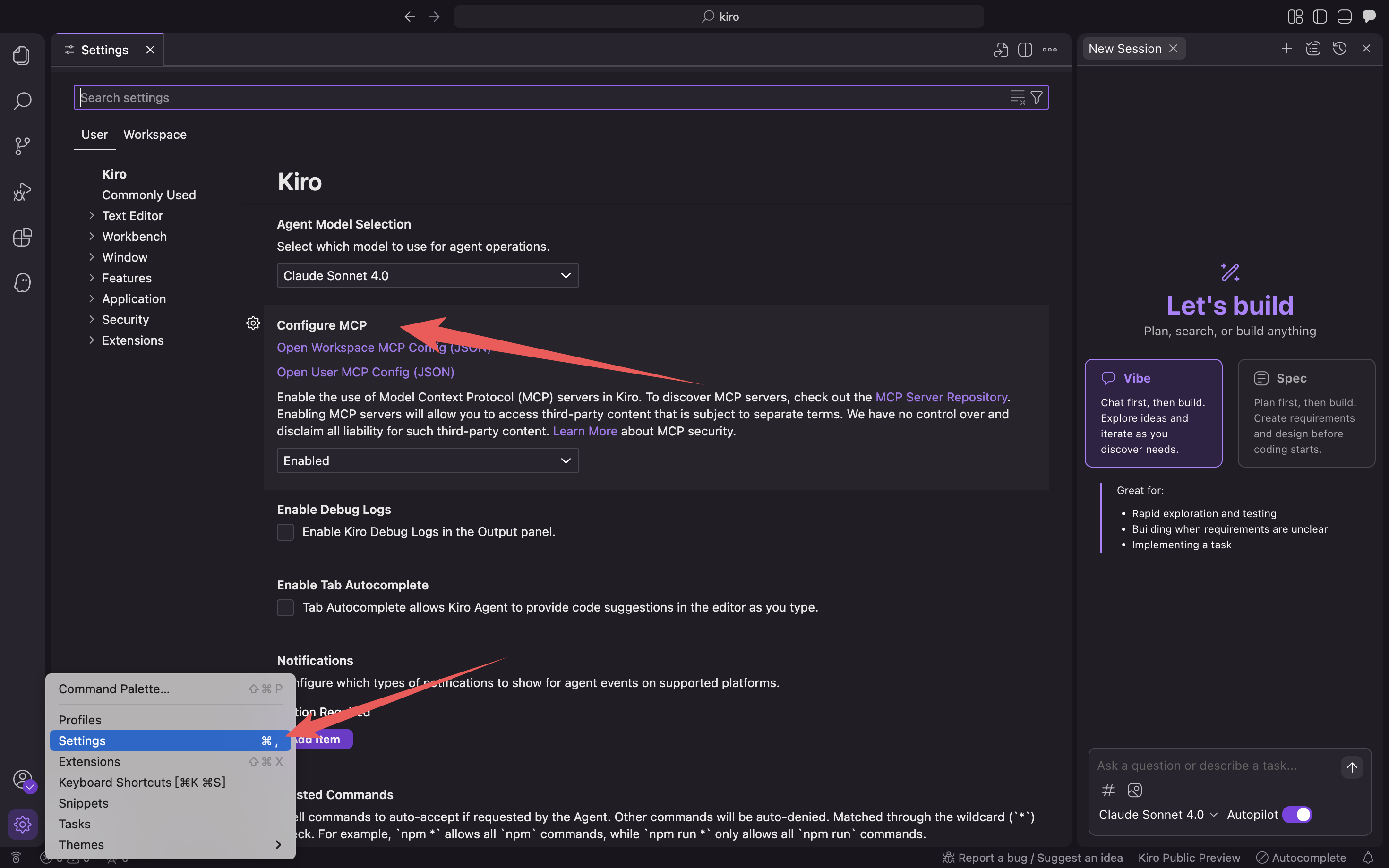
Open User MCP Config (JSON)/Open Workspace MCP Config (JSON) をクリックし、mcp設定ファイルを入力します。
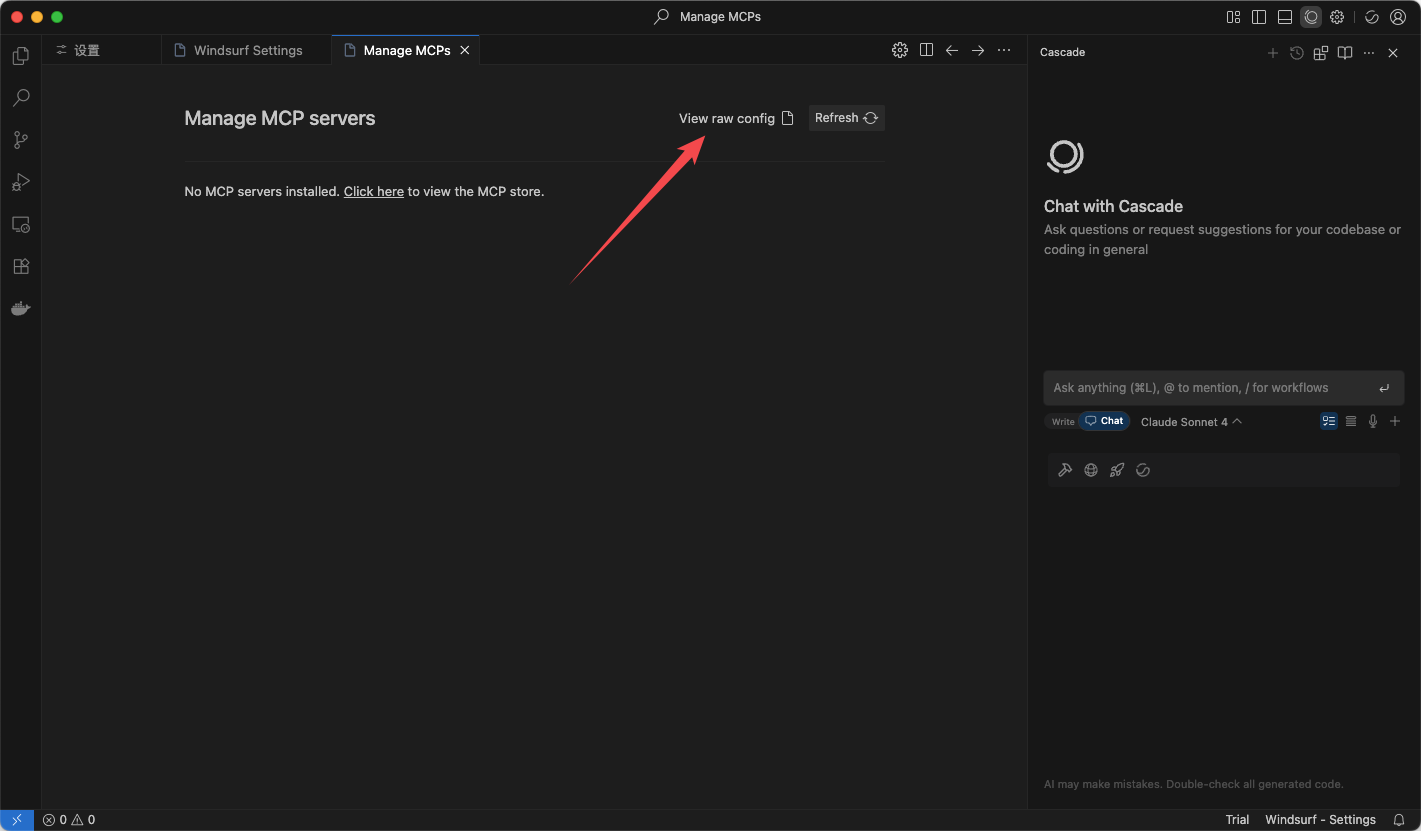
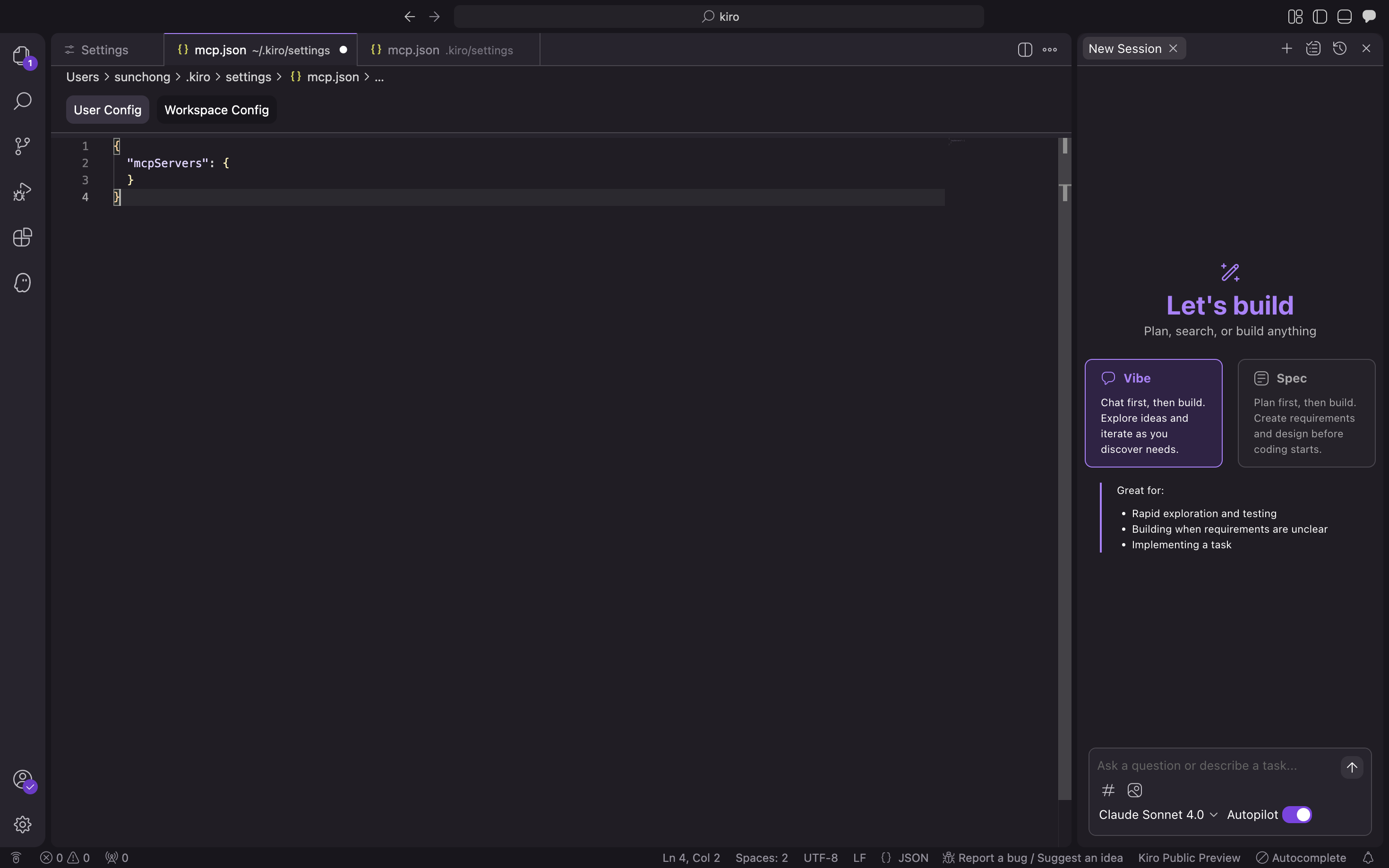
以下の設定ファイルに入力し、確認をクリックします。
/path/to/your/oceanbase_mcp_serverはoceanbase_mcp_serverフォルダの絶対パスに、OB_HOST、OB_PORT、OB_USER、OB_PASSWORD、OB_DATABASEはご自身のデータベースの対応する情報に置き換えてください:{ "mcpServers": { "oceanbase": { "command": "uv", "args": [ "--directory", "/path/to/your/oceanbase_mcp_server/src/oceanbase_mcp_server", "run", "oceanbase_mcp_server" ], "env": { "OB_HOST": "***", "OB_PORT": "***", "OB_USER": "***", "OB_PASSWORD": "***", "OB_DATABASE": "***" } } } }データベースへの接続が可能か確認します。
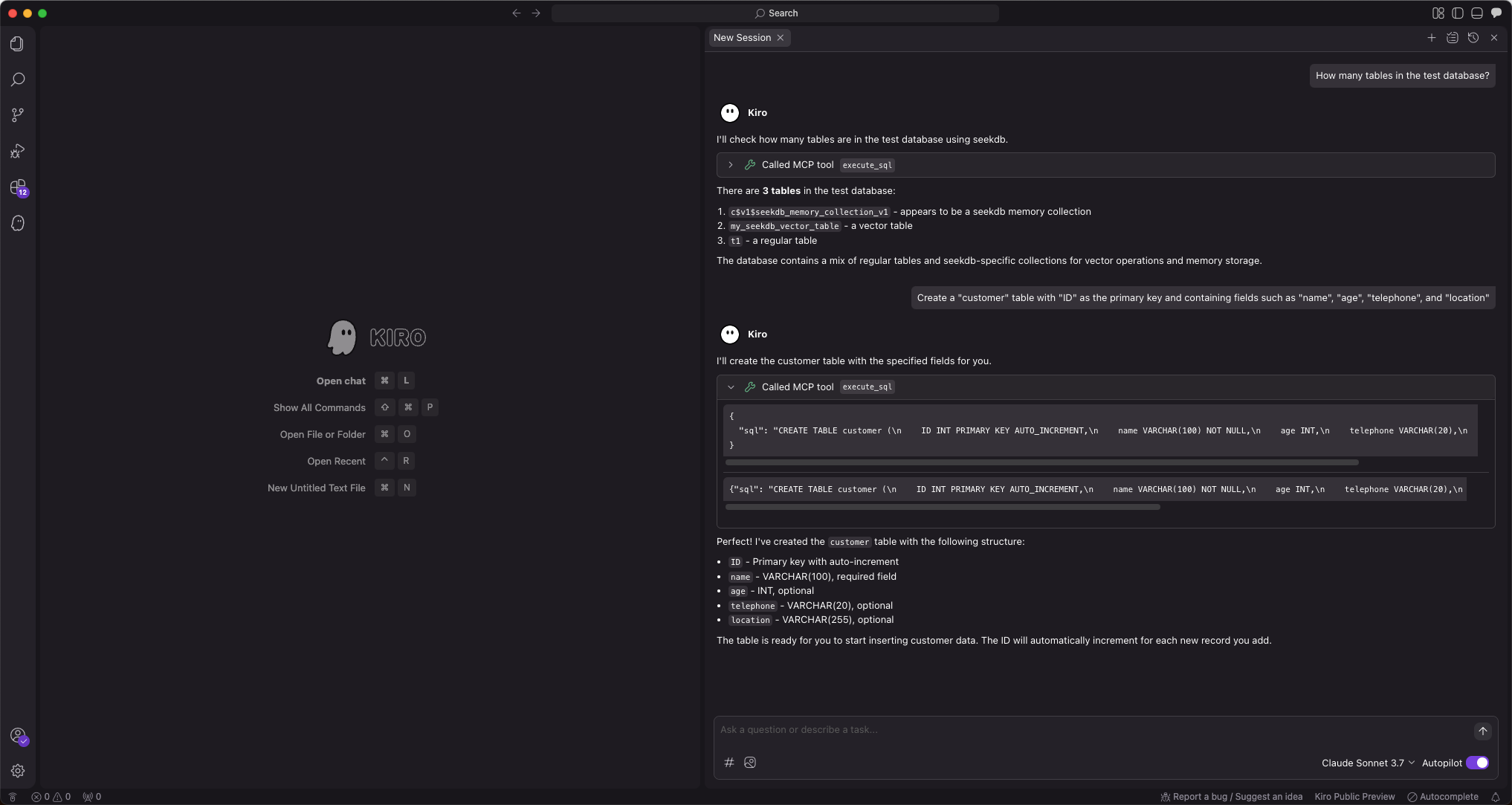
「test 庫中有多少張表」というプロンプトを入力すると、Kiroは実行されるSQL文を表示し、クエリ結果を出力します:
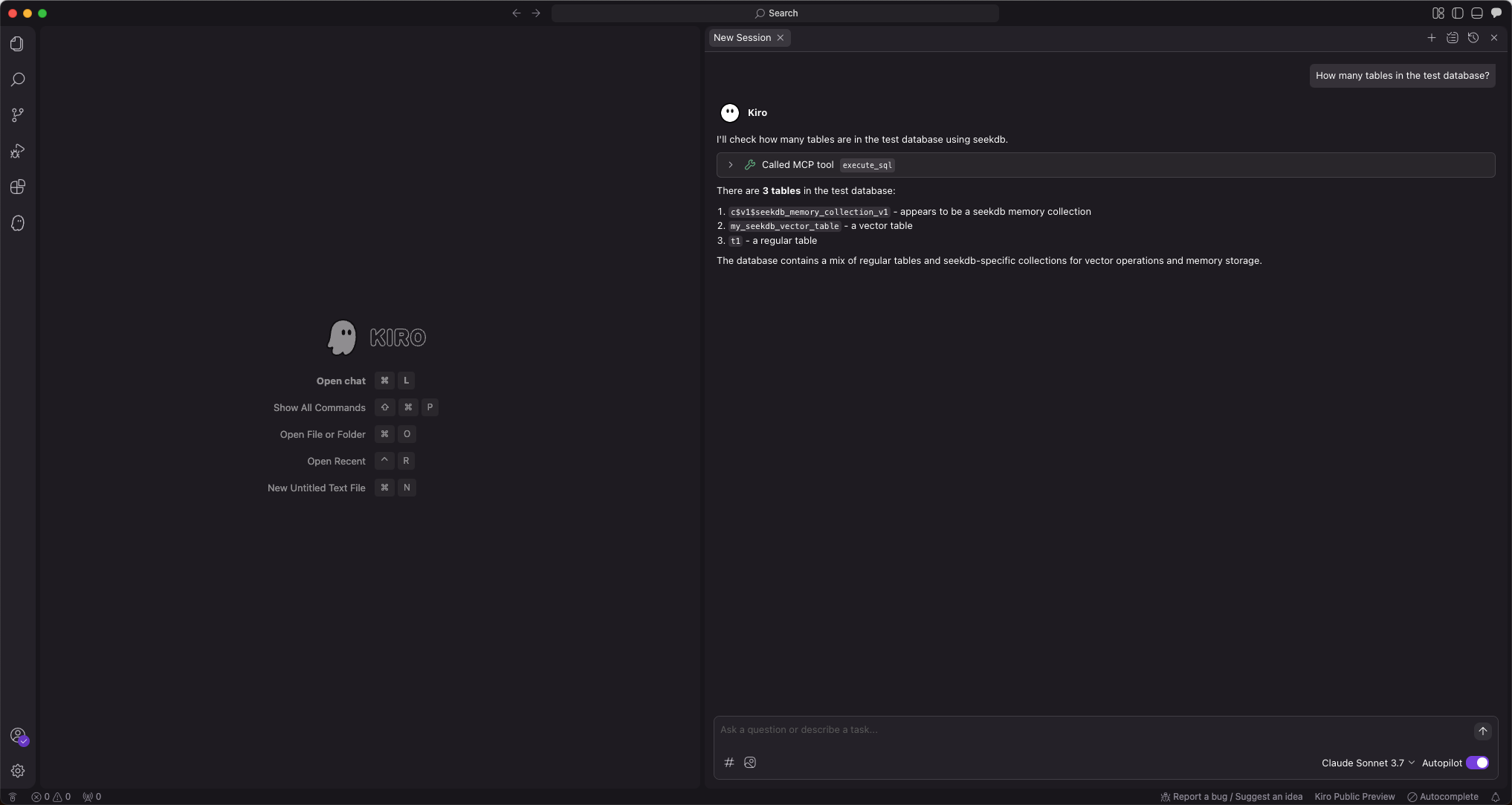
Kiroが現在のtestデータベース内のテーブル数を表示すれば、OceanBaseデータベースへの接続は正常です。
ステップ3:FastAPIを使用してRESTful APIスタイルのプロジェクトを迅速に作成する
FastAPIは、PythonでRESTful APIを迅速に構築できるWebフレームワークです。
テーブルを作成します。
「customerテーブルを作成してください。主キーはIDで、name、age、telephone、locationの各フィールドを含めてください」というプロンプトを入力します:
テストデータを挿入します。
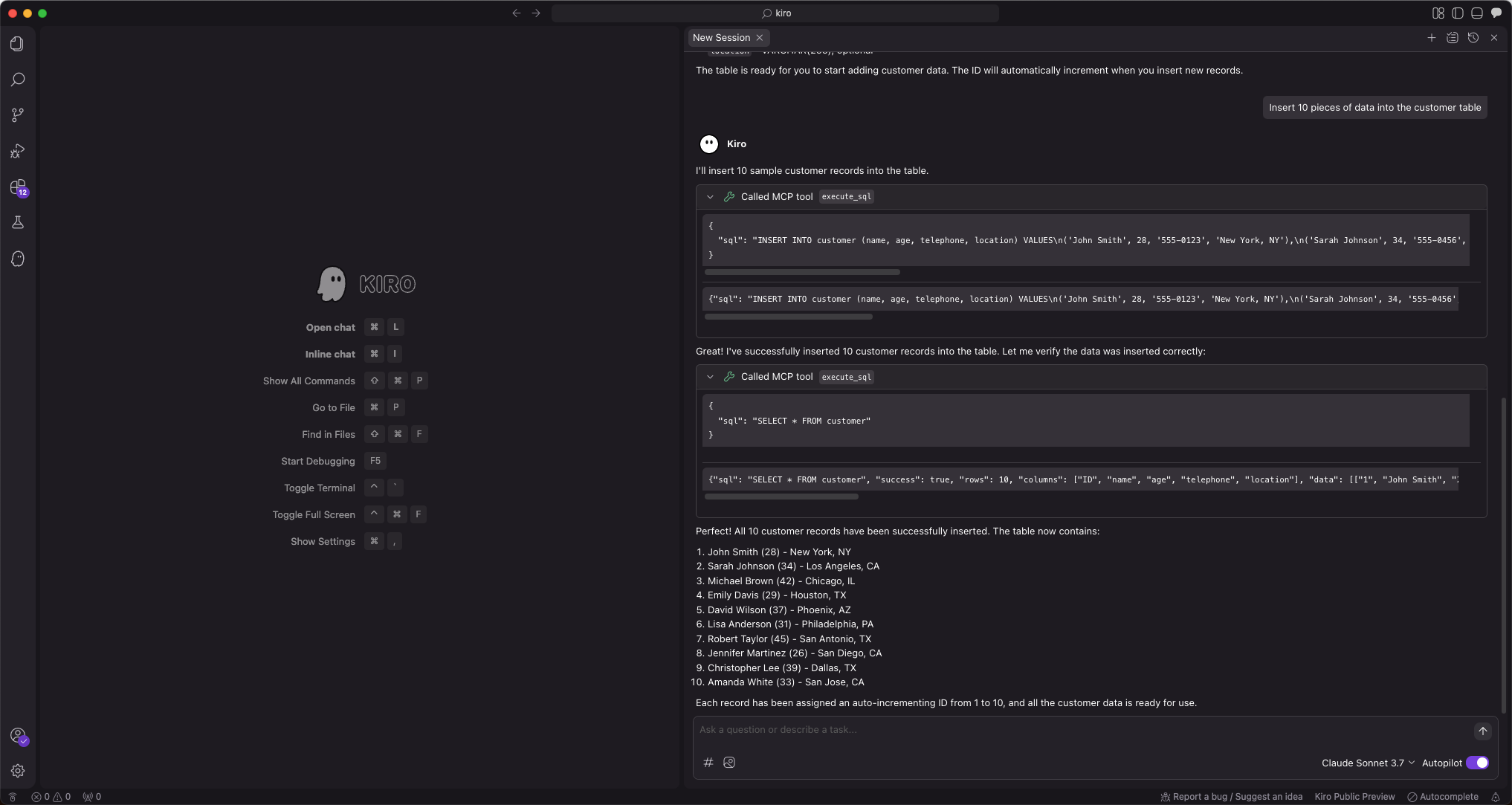
「10件のテストデータを挿入してください」というプロンプトを入力します:
FastAPIプロジェクトを作成します。
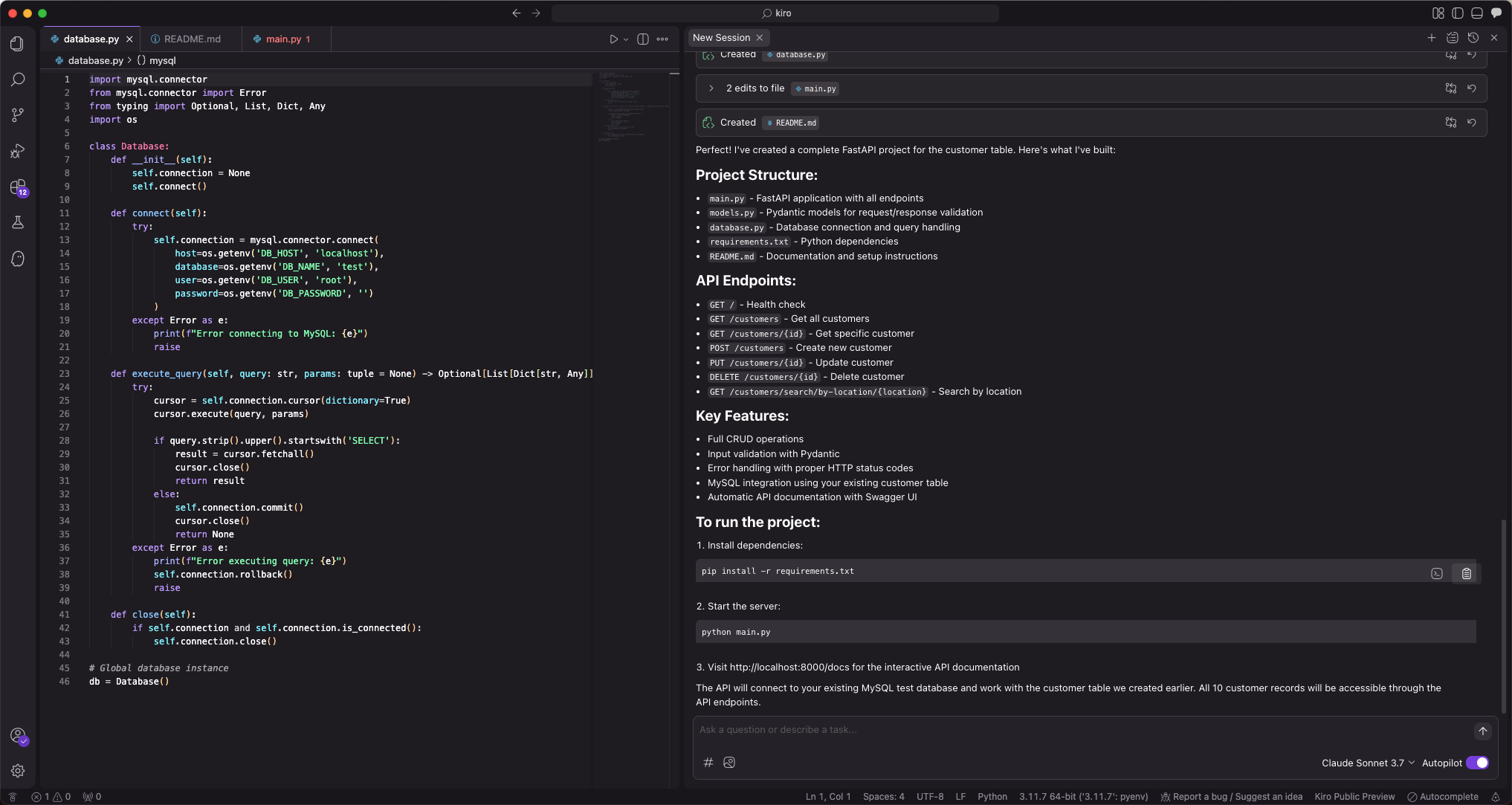
「FastAPIプロジェクトを作成し、customerテーブルに基づいたRESTful APIを生成してください」というプロンプトを入力すると、複数のファイルが自動生成されます。まずはすべて受け入れをクリックします。問題があれば後から修正します。
AIが生成するファイルは毎回異なる場合があるため、ここでは変更の手順は示しません。
以下のコマンドを実行し、現在のディレクトリでuvパッケージ管理ツールを使用して仮想環境を作成し、依存関係をインストールします。
pip install -r requirements.txtFastAPIプロジェクトを起動します。
python3 main.pyテーブル内のデータを確認します。
コマンドラインで
curl http://127.0.0.1:8000/customersを実行するか、他のリクエストツールを使用して、テーブル内のデータを確認します:curl http://127.0.0.1:8000/customers [{"name":"Zhang San","age":28,"telephone":"13812345678","location":"Chaoyang District, Beijing","id":1},{"name":"Li Si","age":35,"telephone":"13987654321","location":"Pudong New Area, Shanghai","id":2},{"name":"Wang Wu","age":42,"telephone":"15612345678","location":"Tianhe District, Guangzhou","id":3},{"name":"Zhao Liu","age":29,"telephone":"18712345678","location":"Nanshan District, Shenzhen","id":4},{"name":"Qian Qi","age":33,"telephone":"13512345678","location":"Xihu District, Hangzhou","id":5},{"name":"Sun Ba","age":26,"telephone":"15987654321","location":"Jinjiang District, Chengdu","id":6},{"name":"Zhou Jiu","age":38,"telephone":"18612345678","location":"Jianghan District, Wuhan","id":7},{"name":"Wu Shi","age":31,"telephone":"13712345678","location":"Gulou District, Nanjing","id":8},{"name":"Zheng Shi Yi","age":27,"telephone":"15812345678","location":"Yanta District, Xi'an","id":9},{"name":"Wang Shier","age":45,"telephone":"18512345678","location":"Yuzhong District, Chongqing","id":10}]追加、削除、更新、検索のコードはすべて生成されています。
from database import db from models import CustomerCreate, CustomerUpdate from typing import List, Optional class CustomerCRUD: @staticmethod def get_all_customers() -> List[dict]: query = "SELECT * FROM customer ORDER BY id" return db.execute_query(query) @staticmethod def get_customer_by_id(customer_id: int) -> Optional[dict]: query = "SELECT * FROM customer WHERE id = %s" result = db.execute_query(query, (customer_id,)) return result[0] if result else None @staticmethod def create_customer(customer: CustomerCreate) -> dict: query = """ INSERT INTO customer (name, age, telephone, location) VALUES (%s, %s, %s, %s) """ customer_id = db.execute_insert( query, (customer.name, customer.age, customer.telephone, customer.location) ) return CustomerCRUD.get_customer_by_id(customer_id) @staticmethod def update_customer(customer_id: int, customer: CustomerUpdate) -> Optional[dict]: # 動的更新クエリの構築 update_fields = [] params = [] if customer.name is not None: update_fields.append("name = %s") params.append(customer.name) if customer.age is not None: update_fields.append("age = %s") params.append(customer.age) if customer.telephone is not None: update_fields.append("telephone = %s") params.append(customer.telephone) if customer.location is not None: update_fields.append("location = %s") params.append(customer.location) if not update_fields: return CustomerCRUD.get_customer_by_id(customer_id) query = f"UPDATE customer SET {', '.join(update_fields)} WHERE id = %s" params.append(customer_id) db.execute_query(query, tuple(params)) return CustomerCRUD.get_customer_by_id(customer_id) @staticmethod def delete_customer(customer_id: int) -> bool: query = "DELETE FROM customer WHERE id = %s" db.execute_query(query, (customer_id,)) return True customer_crud = CustomerCRUD()