


本記事では、MyBatisフレームワークとOceanBaseデータベースを使用して、テーブルの作成、データの挿入、クエリなどの基本的な操作を実現するアプリケーションの構築方法を紹介します。
 クリックしてjava-oceanbase-mybatisサンプルプロジェクトをダウンロード
 前提条件
- OceanBaseデータベースがインストール済みであること。
- JDK 1.8とMavenがインストール済みであること。
- IntelliJ IDEAがインストール済みであること。
説明
この記事でコードを実行するために使用したツールは、IntelliJ IDEA 2021.3.2 (Community Edition)バージョンです。ご自身の好みに合わせて、適切なツールを選択してサンプルコードを実行することも可能です。
操作手順
説明
本記事で示されている操作手順は、Windows環境に基づいています。他のOS環境やコンパイラを使用している場合は、操作手順が若干異なる場合があります。
- OceanBaseデータベースの接続文字列を取得します。
java-oceanbase-mybatisプロジェクトをIDEAにインポートします。java-oceanbase-mybatisプロジェクトのデータベース接続情報を修正します。java-oceanbase-mybatisプロジェクトを実行します。
ステップ1:OceanBaseデータベースの接続文字列を取得する
OceanBaseデータベースのデプロイ担当者または管理者から、該当するデータベース接続文字列を取得します。
obclient -hxx.xx.xx.xx -P2883 -uroot@sys#cluster -p**** -Aデプロイ済みのOceanBaseデータベースに基づいて、以下のURLの対応する情報を入力します。
説明
jdbc.propertiesファイルには、このURL情報が必要です。jdbc:oceanbase://host:port/schema_name?user=$user_name&password=$passwordパラメータの説明:
host:OceanBaseデータベースへの接続IPアドレスを提供します。ODP接続方式ではODPアドレスを使用し、直接接続方式ではOBServerノードのIPアドレスを使用します。port:OceanBaseデータベースへの接続ポートを提供します。ODP接続方式のデフォルトポートは2883で、ODPデプロイ時にカスタマイズ可能です。直接接続方式のデフォルトポートは2881で、OceanBaseデータベースのデプロイ時にカスタマイズ可能です。schema_name:アクセスするスキーマ名です。user_name:-uパラメータで指定します。形式は、ユーザー名@テナント#クラスタ名 または ユーザー名@SERVICE:サービス名 です。ユーザー@テナント#クラスタ名 の形式を使用する場合、デフォルトのテナントはsys、管理者ユーザーはrootです。データベースに直接接続する場合、クラスタ名を省略できますが、ODP接続の場合は入力する必要があります。password:アカウントのパスワード。
詳細なURLパラメータの説明については、データベースURLを参照してください。
ステップ2:java-oceanbase-mybatis プロジェクトをIDEAにインポートする
IntelliJ IDEA を起動し、File > Open... オプションを選択します。

ポップアップ表示された Open File or Project ウィンドウで、対応するプロジェクトファイルを選択し、OK をクリックすると、プロジェクトファイルのインポートが完了します。
IntelliJ IDEAは、プロジェクト内のさまざまな種類のファイルを自動的に認識します。Project ツールウィンドウで、プロジェクトのディレクトリ構造、ファイルリスト、モジュールリスト、依存関係などの情報を確認することができます。Project ツールウィンドウは通常、IntelliJ IDEAインターフェースの一番左側にあり、デフォルトで表示されています。Project ツールウィンドウが表示されていない場合は、メニューバーの View > Tool Windows > Project とクリックするか、ショートカットキー Alt + 1 で再表示することができます。
説明
IntelliJ IDEAを使用してプロジェクトをインポートすると、IntelliJ IDEAはプロジェクト内のpom.xmlファイルを自動的に検出し、ファイルに記述されている依存関係に基づいて必要な依存ライブラリを自動的にダウンロードして、プロジェクトに追加します。
プロジェクトの状況を確認します。
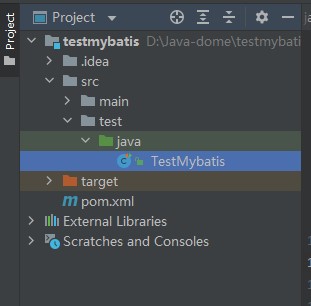
ステップ3:java-oceanbase-mybatis プロジェクトのデータベース接続情報を修正します。
ステップ1:OceanBaseデータベースの接続文字列を取得する に記載されている情報に基づいて、jdbc.properties ファイル内のデータベース接続情報を修正します。
例:
- データベースドライバーの名前:
com.oceanbase.jdbc.Driver - OBServerノードのIPアドレスは
10.10.10.1です。 - アクセスポートは2881を使用します。
- アクセスするスキーマ名は
testです。 - URLに追加の接続プロパティとして
useServerPrepStmts=true&rewriteBatchedStatements=trueを設定します。 - テナントの接続アカウントは
root@mysql001です。mysql001はOceanBaseデータベースで作成されたMySQLモードのユーザーテナントであり、rootはテナントmysql001のユーザー名です。 - パスワードは
******です。
サンプルコードは以下のとおりです:
jdbc.driver=com.mysql.cj.jdbc.Driver
jdbc.url=jdbc:oceanbase://10.10.10.1:2881/sys?useServerPrepStmts=true&rewriteBatchedStatements=true
jdbc.username=root@mysql001
jdbc.password=******
ステップ4:java-oceanbase-mybatis プロジェクトを実行する
実行パス
- プロジェクト構造内の src > test > java から
TestMybatis.javaファイルを見つけます。 - ツールメニューバーで 実行(U) > 実行 > TestMybatis を選択するか、右上の緑色の三角形を直接クリックして実行します。
- IDEAのコンソールを使用して、プロジェクトのログ情報と出力結果を確認します。
実行結果
testUserMapperメソッドを実行した結果は以下のとおりです:User{id=2, name='update'} User{id=3, name='insert'} User{id=4, name='insert'} User{id=5, name='insert'} User{id=6, name='insert'} User{id=7, name='insert'} User{id=8, name='insert'} User{id=9, name='insert'} User{id=10, name='insert'} usersByPage = [User{id=5, name='insert'}, User{id=6, name='insert'}, User{id=7, name='insert'}]testSqlSessionメソッドを実行した結果は次のとおりです:User{id=2, name='update'} User{id=3, name='insert'} User{id=4, name='insert'} User{id=5, name='insert'} User{id=6, name='insert'} User{id=7, name='insert'} User{id=8, name='insert'} User{id=9, name='insert'} User{id=10, name='insert'}testAppMapperメソッドを実行した結果は以下のとおりです:App{id=2, name='update'} App{id=3, name='insert3'} App{id=4, name='insert4'} App{id=5, name='insert5'} App{id=6, name='insert6'} App{id=7, name='insert7'} App{id=8, name='insert8'} App{id=9, name='insert9'} App{id=10, name='insert10'} pageList = Page{count=true, pageNum=2, pageSize=3, startRow=3, endRow=6, total=9, pages=3, reasonable=false, pageSizeZero=true}[App{id=5, name='insert5'}, App{id=6, name='insert6'}, App{id=7, name='insert7'}]完全な出力結果は以下のとおりです:
User{id=2, name='update'} User{id=3, name='insert'} User{id=4, name='insert'} User{id=5, name='insert'} User{id=6, name='insert'} User{id=7, name='insert'} User{id=8, name='insert'} User{id=9, name='insert'} User{id=10, name='insert'} usersByPage = [User{id=5, name='insert'}, User{id=6, name='insert'}, User{id=7, name='insert'}] App{id=2, name='update'} App{id=3, name='insert3'} App{id=4, name='insert4'} App{id=5, name='insert5'} App{id=6, name='insert6'} App{id=7, name='insert7'} App{id=8, name='insert8'} App{id=9, name='insert9'} App{id=10, name='insert10'} pageList = Page{count=true, pageNum=2, pageSize=3, startRow=3, endRow=6, total=9, pages=3, reasonable=false, pageSizeZero=true}[App{id=5, name='insert5'}, App{id=6, name='insert6'}, App{id=7, name='insert7'}] User{id=2, name='update'} User{id=3, name='insert'} User{id=4, name='insert'} User{id=5, name='insert'} User{id=6, name='insert'} User{id=7, name='insert'} User{id=8, name='insert'} User{id=9, name='insert'} User{id=10, name='insert'}
プロジェクトコードについて
java-oceanbase-mybatisをクリックしてプロジェクトコードをダウンロードします。これは、java-oceanbase-mybatis という圧縮ファイルです。
解凍すると、java-oceanbase-mybatis という名前のフォルダが作成されます。ディレクトリ構造は以下のとおりです:
│--pom.xml
│
├─.idea
│
├─src
│ ├─main
│ │ ├─java
│ │ │ └─com
│ │ │ └─oceanbase
│ │ │ ├─mapper
│ │ │ │------IAppMapper.java
│ │ │ │------IUserMapper.java
│ │ │ │
│ │ │ └─pojo
│ │ │ │---App.java
│ │ │ └─--User.java
│ │ │
│ │ └─resources
│ │ │--jdbc.properties
│ │ │--mybatis-config.xml
│ │ │
│ │ └─com
│ │ └─oceanbase
│ │ └─mapper
│ │ └─---IUserMapper.xml
│ │
│ └─test
│ └─java
│ └─---TestMybatis.java
│
└─target
ファイルの説明:
pom.xml:Mavenプロジェクトの設定ファイルで、プロジェクトの依存関係、プラグイン、ビルドなどの情報が含まれます。.idea:IDE (統合開発環境)で使用されるディレクトリで、プロジェクト関連の設定情報を格納するために使用されます。src:通常、プロジェクトのソースコードを格納するディレクトリを表すために使用されます。main: 主要なソースコードとリソースファイルを格納するディレクトリです。java:Javaソースコードを格納するディレクトリです。com:Javaパッケージを格納するルートディレクトリです。oceanbase: プロジェクトを格納するルートディレクトリです。mapper:MyBatisのMapperインターフェースとXMLファイルを格納します。IAppMapper.java:アプリケーションデータアクセス層のインターフェースを保存します。IUserMapper.java:ユーザーデータアクセス層のインターフェースを保存します。pojo: JavaBeanまたはエンティティクラスを格納します。App.java:アプリケーションエンティティクラスを格納します。User.java:ユーザーエンティティクラスを格納します。resources: リソースファイルを格納するディレクトリで、設定ファイル、SQLファイルなどが含まれます。jdbc.properties: データベース接続情報の設定ファイルを格納します。mybatis-config.xml:MyBatisの設定ファイルを格納します。IUserMapper.xml:ユーザーデータアクセス層のXML設定ファイルを格納します。test: テストコードとリソースファイルを格納するディレクトリです。TestMybatis.java:MyBatisのテスト用Javaクラスを格納します。target: コンパイル後のClassファイル、JARパッケージなどのファイルを格納するディレクトリです。
pom.xmlのコード紹介
説明
例を確認するだけの場合、デフォルトコードを使用してください。修正する必要はありません。以下の説明に従って、必要に応じて pom.xml ファイルを修正することもできます。
pom.xml 設定ファイルの内容は以下のとおりです:
ファイル宣言ステートメントです。
このファイルがXMLファイルであり、使用しているXMLのバージョンが
1.0で、文字エンコーディング方式がUTF-8であることを宣言しています。コードは以下のとおりです:
<?xml version="1.0" encoding="UTF-8"?>POMのネームスペースとPOMモデルバージョンを設定します。
xmlnsを使用して、POMのネームスペースをhttp://maven.apache.org/POM/4.0.0と指定します。xmlns:xsiを使用して、XMLネームスペースをhttp://www.w3.org/2001/XMLSchema-instanceと指定します。xsi:schemaLocationを使用して、POMのネームスペースをhttp://maven.apache.org/POM/4.0.0、POMのXSDファイルの場所をhttp://maven.apache.org/xsd/maven-4.0.0.xsdと指定します。<modelVersion>要素を使用して、このPOMファイルで使用するPOMモデルのバージョンを4.0.0と指定します。
コードは以下のとおりです:
<project xmlns="http://maven.apache.org/POM/4.0.0" xmlns:xsi="http://www.w3.org/2001/XMLSchema-instance" xsi:schemaLocation="http://maven.apache.org/POM/4.0.0 http://maven.apache.org/xsd/maven-4.0.0.xsd"> <modelVersion>4.0.0</modelVersion> </project>基本情報を設定します。
<groupId>を使用して、プロジェクト識別子をcom.oceanbase.exampleと指定します。<artifactId>を使用して、プロジェクトの依存関係をjava-oceanbase-mybatisと指定します。<version>を使用して、プロジェクトのバージョン番号を1.0-SNAPSHOTと指定します。
コードは以下のとおりです:
<groupId>com.oceanbase.example</groupId> <artifactId>java-oceanbase-mybatis</artifactId> <version>1.0-SNAPSHOT</version><build>タグを使用して、プロジェクトのビルドプロセスを定義します。<plugins>を使用して、プロジェクトで設定するプラグインを指定します。<plugin>を使用して、プロジェクトでプラグインを1つ設定します。<groupId>を使用して、プロジェクトの識別子をorg.apache.maven.pluginsと指定します。<artifactId>を使用して、プロジェクトの依存関係をmaven-compiler-pluginと指定します。<configuration>を使用して、設定するプラグインのパラメータを指定します。<source>を使用して、コンパイラのソースコードバージョンを8と指定します。<target>を使用して、コンパイラのソースコードバージョンを8と指定します。
コードは以下のとおりです:
<build> <plugins> <plugin> <groupId>org.apache.maven.plugins</groupId> <artifactId>maven-compiler-plugin</artifactId> <configuration> <source>8</source> <target>8</target> </configuration> </plugin> </plugins> </build><dependencies>を使用して、プロジェクトが依存するコンポーネントを定義します。依存関係が所属する組織を
com.oceanbase、名前をoceanbase-client、バージョン番号を2.4.2と指定します。コードは以下のとおりです:
<dependencies> <dependency> <groupId>com.oceanbase</groupId> <artifactId>oceanbase-client</artifactId> <version>2.4.2</version> </dependency> </dependencies>依存関係が所属するテストアーキテクチャを
junit、名前をjunit、バージョン番号を4.10と指定します。コードは以下のとおりです:
<dependencies> <dependency> <groupId>junit</groupId> <artifactId>junit</artifactId> <version>4.10</version> </dependency> </dependencies>依存関係が所属するアーキテクチャを
org.mybatis、名前をmybatis、バージョン番号を3.5.9と指定します。コードは以下のとおりです:
<dependencies> <dependency> <groupId>org.mybatis</groupId> <artifactId>mybatis</artifactId> <version>3.5.9</version> </dependency> </dependencies>依存関係が所属するプラグインを
com.github.pagehelper、名前をpagehelper、バージョン番号を5.3.0と指定します。コードは以下のとおりです:
<dependencies> <dependency> <groupId>com.github.pagehelper</groupId> <artifactId>pagehelper</artifactId> <version>5.3.0</version> </dependency> </dependencies>
jdbc.propertiesのコード紹介
jdbc.properties は、データベース接続関連の設定情報を格納しているプロパティファイルです。データベースのURL、ユーザー名、パスワードなどが含まれます。コードに含まれる内容は以下のとおりです:
説明
コード内の各フィールドの値は、ステップ1:OceanBaseデータベース接続文字列を取得するから取得します。
jdbc.driver:データベースドライバープログラムのクラス名で、データベースドライバーを読み込むために使用されます。jdbc.url:データベースのURLアドレスで、接続するデータベースを指定するために使用されます。jdbc.username:データベースのユーザー名で、データベース接続を検証するために使用されます。jdbc.password:データベースのパスワードで、データベース接続を検証するために使用されます。
コードは以下のとおりです:
jdbc.driver=com.mysql.cj.jdbc.Driver
jdbc.url=jdbc:mysql://host:port/TEST?useServerPrepStmts=true&rewriteBatchedStatements=true
jdbc.username=user_name
jdbc.password=******
mybatis-config.xmlの紹介
mybatis-config.xml ファイルは、MyBatisフレームワークのグローバルプロパティやプラグインなどを設定するために使用されます。
mybatis-config.xml ファイルのコードには、主に以下の部分が含まれます:
ファイル宣言です。
このファイルがXMLファイルであることを宣言しています。この宣言は、この記事がMyBatis設定ファイルであり、使用するXMLバージョンは
1.0、文字エンコーディング方式はUTF-8であることを示しています。バージョン番号は3.0、言語は英語で、MyBatis公式Webサイトが提供するDTD (Document Type Definition)ファイルによる検証が使用されています。宣言には以下の部分が含まれます:
version:XMLファイルのバージョンを指定します。encoding:XMLファイルのエンコーディング方式を指定します。DOCTYPE:タイプをドキュメントタイプ宣言と宣言します。configuration:ドキュメントタイプをMyBatis設定ファイルと指定します。PUBLIC:ドキュメントタイプを公開ドキュメントタイプと指定します。mybatis.org:MyBatisの公式Webサイトを表します。DTD Config 3.0:MyBatis設定ファイルのバージョン番号を表します。EN:ドキュメントタイプの言語が英語であることを表します。
コードは以下のとおりです:
<?xml version="1.0" encoding="UTF-8"?> <!DOCTYPE configuration PUBLIC "-//mybatis.org//DTD Config 3.0//EN" "http://mybatis.org/dtd/mybatis-3-config.dtd">読み込むプロパティファイルのパスとファイル名を指定します。
<properties resource="jdbc.properties"></properties>MyBatisのグローバル設定を設定します。
MyBatisのグローバル設定には以下の部分が含まれています:
setting:キャッシュ、ログなどの個々の構成パラメータを設定するために使用されます。cacheEnabled:キャッシュ機能を有効または無効にするために使用されます。trueに設定します。lazyLoadingEnabled:遅延ロード機能を有効または無効にするために使用されます。trueに設定します。aggressiveLazyLoading:積極的な遅延ロード機能を有効または無効にするために使用されます。trueに設定します。multipleResultSetsEnabled:複数の結果セットのサポートを有効にするかどうかを設定するために使用されます。trueに設定します。useColumnLabel:結果セット内の列名として列ラベルを使用するかどうかを設定するために使用されます。trueに設定します。useGeneratedKeys:自動ビルドされた主キーを使用するかどうかを設定するために使用されます。trueに設定します。autoMappingBehavior:自動マッピングの処理動作をPARTIALに設定するために使用されます。。defaultExecutorType:デフォルトのエグゼキュータータイプを設定するために使用されます。SIMPLEに設定します。mapUnderscoreToCamelCase:データベース列名のアンダースコアをJavaオブジェクトのプロパティ名におけるキャメルケースに変換するかどうかを設定するために使用されます。trueに設定します。localCacheScope:ローカルキャッシュのスコープを設定するために使用されます。SESSIONに設定します。jdbcTypeForNull:空値を処理する際に使用するJDBCタイプを設定するために使用されます。NULLに設定します。
説明
settings要素のサブ要素はオプションであり、必要に応じて追加または削除できます。
コードは以下のとおりです:
<settings> <!-- Enable or disable caching for global mappers. --> <setting name="cacheEnabled" value="true"/> <!-- Enable or disable lazy loading globally. When disabled, all associated objects are loaded immediately. --> <setting name="lazyLoadingEnabled" value="true"/> <!-- When enabled, objects with delayed loading properties will fully load any properties when called. Otherwise, each attribute will be loaded as needed. --> <setting name="aggressiveLazyLoading" value="true"/> <!-- Allow a single SQL statement to return multiple datasets (depending on driver compatibility) default: true --> <setting name="multipleResultSetsEnabled" value="true"/> <!-- Can column aliases be used (depending on driver compatibility) default: true --> <setting name="useColumnLabel" value="true"/> <!-- Allow JDBC to generate primary keys. Drive support is required. If set to true, this setting will force the use of the generated primary key, and some drives may not be compatible but can still be executed. default:false --> <setting name="useGeneratedKeys" value="true"/> <!-- Specify how MyBatis automatically maps the columns of the data base table NONE: Not Implicit PART: Partial FULL: All --> <setting name="autoMappingBehavior" value="PARTIAL"/> <!-- This is the default execution type (SIMPLE: simple; REUSE: executor may repeatedly use prepared statements; BATCH: executor can repeatedly execute statements and batch updates) --> <setting name="defaultExecutorType" value="SIMPLE"/> <!-- Convert fields using camel naming. --> <setting name="mapUnderscoreToCamelCase" value="true"/> <!-- Set the local cache range session: there will be data sharing statement: statement range (so there will be no data sharing) defalut: session --> <setting name="localCacheScope" value="SESSION"/> <!-- When the JDBC type is set to null, some drivers need to specify a value, default: Other, and there is no need to specify a type when inserting null values --> <setting name="jdbcTypeForNull" value="NULL"/> </settings>MyBatisのプラグインを設定します。
MyBatisのプラグインには以下の部分が含まれます:
plugin:個々のプラグインを設定するために使用されます。property:プラグインのプロパティを指定するために使用されます。interceptor:プラグインの実装クラスを指定するために使用されます。helperDialect:選択されたデータベースを指定するために使用されます。offsetAsPageNum:offsetパラメータをpageNumパラメータとして使用するかどうかを表します。rowBoundsWithCount:countクエリを実行するかどうかを表します。pageSizeZero:pageSizeが0のクエリをサポートするかどうかを表します。reasonable:クエリの最適化を有効にするかどうかを表します。params:ページネーションパラメータを渡すためのパラメータ名とパラメータ値のマッピング関係を表します。supportMethodsArguments:メソッドのパラメータを使用してページネーションパラメータを渡すことをサポートするかどうかを表します。returnPageInfo:戻り値のタイプを表します。
コードは以下のとおりです:
<plugin interceptor="com.github.pagehelper.PageInterceptor"> <!-- this parameter indicates which database to connect to --> <!--MySQLMode dialect<property name="helperDialect" value="mysql"/>--> <!--OracleMode dialect --> <property name="helperDialect" value="mysql"/> <!-- This parameter defaults to false. When set to true, the first parameter offset of RowBounds will be used as the pageNum page number, similar to the pageNum effect in startPage --> <property name="offsetAsPageNum" value="true"/> <!-- This parameter defaults to false, and when set to true, using RowBounds pagination will result in a count query --> <property name="rowBoundsWithCount" value="true"/> <!-- When set to true, if pageSize=0 or RowBounds. limit=0, all results will be queried (equivalent to not executing a pagination query, but the returned results are still of type Page) --> <property name="pageSizeZero" value="true"/> <!-- Version 3.3.0 is available - pagination parameter rationalization is disabled by default as false. When rationalization is enabled, if pageNum<1, the first page will be queried, and if pageNum>pages, the last page will be queried. Rationalization of paging parameters. When rationalization is disabled, if pageNum<1 or pageNum>pages returns empty data --> <property name="reasonable" value="false"/> <!-- Version 3.5.0 is available - In order to support the startPage (Object params) method, a 'params' parameter has been added to configure parameter mapping, which can be used to retrieve values from Map or ServletRequest. PageNum, pageSize, count, pageSizeZero, reasonable, orderBy can be configured. If mapping is not configured, the default value will be used. If you do not understand the meaning, do not copy this configuration casually --> <property name="params" value="pageNum=start;pageSize=limit;"/> <!-- Support passing paging parameters through Mapper interface parameters --> <property name="supportMethodsArguments" value="true"/> <!-- Always always returns PageInfo type, check to check if the return type is PageInfo, and none returns Page --> <property name="returnPageInfo" value="check"/> </plugin>MyBatisの環境を設定します。 MyBatisの環境には以下の部分が含まれます:
environment:個々の環境を設定するために使用されます。transactionManager:トランザクションマネージャーの実装クラスを指定するために使用されます。dataSource:データソースの実装クラスを指定するために使用されます。property:データベースドライバーのクラス名を指定するために使用されます。
説明
MyBatisの他の設定要素では、
${}プレースホルダーを使用して、環境で設定されたデータソース、トランザクションマネージャー、エグゼキューターなどをインポートできます。コードは以下のとおりです:
<environments default="development"> <environment id="development"> <transactionManager type="JDBC"/> <dataSource type="POOLED"> <property name="driver" value="${jdbc.driver}"/> <property name="url" value="${jdbc.url}"/> <property name="username" value="${jdbc.username}"/> <property name="password" value="${jdbc.password}"/> </dataSource> </environment> </environments>MyBatisのマッパーを設定します。
MyBatisのマッパーでよく使用される要素は以下のとおりです:
- resource:マッパーのXML設定ファイルのパスとファイル名を指定するために使用されます。
- class:マッパーのJavaクラス名を指定するために使用されます。
説明
XML設定ファイルを使用する場合は、mapper要素でXMLファイルのパスとファイル名を指定する必要があります。Javaインターフェースを使用する場合は、mapper要素でJavaクラスの完全修飾名を指定する必要があります。
コードは以下のとおりです:
<mappers> <!-- IUserMapper.xml mapping file --> <mapper resource="com/alipay/oceanbase/mapper/IUserMapper.xml"></mapper> <!-- IAppMapper mapping class --> <mapper class="com.oceanbase.mapper.IAppMapper"></mapper> </mappers>
IUserMapper.xmlのコード紹介
IUserMapper.xml ファイルは、ユーザーオブジェクトに関連付けられたSQLステートメントを定義するマッピングファイルです。このファイルでは、ユーザーオブジェクトに関連付けられたSQLステートメントを格納するための IUserMapper というネームスペースが定義されています。
説明
例を確認するだけの場合、デフォルトコードを使用してください。修正する必要はありません。修正が必要な場合は、実際の状況に応じて修正してください。
IUserMapper.xml ファイルのコードは、主に以下の部分が含まれます:
ファイル宣言ステートメントです。 XMLファイルの宣言セクションでは、XMLファイルのバージョンとエンコード方式を指定します。DTDファイルの宣言セクションでは、MyBatisのDTDファイルをインポートします。 コードは以下のとおりです:
<?xml version="1.0" encoding="UTF-8"?> <!DOCTYPE mapper PUBLIC "-//mybatis.org//DTD Mapper 3.0//EN" "http://mybatis.org/dtd/mybatis-3-mapper.dtd">IUserMapper.javaとのマッピング関係を設定します。- Javaコード内の
Mapperインターフェースと対応するMapperインターフェースのネームスペースを定義します。 insertUserという名前のSQLステートメントを作成し、test_userテーブルにレコードを挿入します。idとnameの2つのフィールドを含み、値はそれぞれ#{id}と#{name}です。parameterTypeプロパティは、渡されるパラメータのタイプをcom.oceanbase.pojo.Userと指定しました。deleteUserという名前のSQLステートメントを作成し、test_userテーブルからレコードを削除します。idフィールドの値が#{id}にマッチするレコードを削除します。updateUserという名前のSQLステートメントを作成し、test_userテーブル内のレコードを更新します。idフィールドの値が#{id}にマッチするレコードのnameフィールドの値を#{name}に更新します。selectUsersという名前のSQLステートメントを作成し、test_userテーブル内のすべてのユーザーレコードのクエリを実行します。selectUserByPageという名前のSQLステートメントを作成し、test_userテーブルから指定されたページ数のユーザーオブジェクトのクエリを実行します。サブクエリとrownumフィールドを使用してページネーションクエリを実行します。#{pageNum}と#{pageSize}は、現在のページ番号と1ページあたりのレコード数を表します。
コードは以下のとおりです:
<?xml version="1.0" encoding="UTF-8"?> <!DOCTYPE mapper PUBLIC "-//mybatis.org//DTD Mapper 3.0//EN" "http://mybatis.org/dtd/mybatis-3-mapper.dtd"> <mapper namespace="com.oceanbase.mapper.IUserMapper"> <insert id="insertUser" parameterType="com.oceanbase.pojo.User"> INSERT INTO test_user (id,name) VALUES (#{id},#{name}) </insert> <delete id="deleteUser" parameterType="long"> DELETE FROM test_user WHERE id = #{id} </delete> <update id="updateUser" parameterType="com.oceanbase.pojo.User"> UPDATE test_user SET name = #{name} WHERE id = #{id} </update> <select id="selectUsers" resultType="com.oceanbase.pojo.User"> SELECT id,name FROM test_user </select> <!-- There are two ways to paginate queries: 1. Use the pagehelper plugin; 2. Use SQL statements to paginate --> <!-- SQL statement pagination: Oracle mode does not support the limit keyword, and instead uses the unique field 'rownum'--> <select id="selectUserByPage" resultType="com.oceanbase.pojo.User"> select id,name from ( select row_.*, rownum rownum_ from ( select * from test_user ) row_ where rownum <![CDATA[ <= ]]> #{pageNum} * #{pageSize} ) where rownum_ <![CDATA[ >]]> ( #{pageNum}- 1) * #{pageSize} </select> </mapper>- Javaコード内の
IAppMapper.javaのコード紹介
IAppMapper.java ファイルは、SQLマッピング関係を定義するために使用されます。
IAppMapper.java ファイルのコードには、主に以下の部分が含まれます:
Mapperパッケージを定義します。現在のファイルが属するパッケージ名を
com.oceanbase.mapperと宣言します。Mapperパッケージには、以下のインターフェースとクラスが含まれます:Appインターフェース:データベーステーブルとのマッピングを表し、データの読み書き操作を実装します。org.apache.ibatis.annotations.*:MyBatisのアノテーションクラスをインポートするために使用されます。java.util.List:java.utilパッケージのListクラスをインポートするために使用されます。 コードは以下のとおりです:
package com.oceanbase.mapper; import com.oceanbase.pojo.App; import org.apache.ibatis.annotations.*; import java.util.List;IAppMapperインターフェースを定義します。IAppMapperインターフェースは、MyBatisのMapperインターフェースを定義するために使用されます。Mapperインターフェースは、SQLマッピング関係を定義し、データベースに対する追加、削除、変更、クエリの操作を実装するために使用されます。具体的には、IAppMapperインターフェースはtest_appテーブルに対する追加、削除、変更、クエリのメソッドを定義しています。以下が含みます:@Insertメソッド:データベースにデータを挿入するために使用されます。@Updateメソッド:データベース内のデータを更新するために使用されます。@Deleteメソッド:データベース内のデータを削除するために使用されます。@Selectメソッド:データベース内のデータのクエリを実行するために使用されます。@Resultsメソッド:クエリ結果のマッピング関係を表し、クエリ結果のフィールドをJavaオブジェクトのプロパティにマッピングします。 データベースに対する追加、削除、変更、クエリの操作は以下のとおりです:
データの挿入 Appオブジェクトを
test_appテーブル内のレコードにマッピングします。Appオブジェクトのプロパティ値は#{プロパティ名}の形式でプレースホルダーとして使用されます。Integerタイプの戻り値は、SQLステートメントによるデータの挿入後に返される自動ビルドされたID、つまりtest_appテーブル内のIDフィールドに対応する値となります。@Insert("insert into test_app(id,name) values(#{id},#{name})") Integer insertApp(App app);データの削除
test_appテーブルから、IDが#{id}のデータを削除します。@Delete("delete from test_app where id =#{id}") Integer deleteApp(Long id);データの更新
test_appテーブル内のレコードを変更するには、Update操作を実行する必要があります。@Update("update test_app set name= #{name} where id = #{id}") Integer updateApp(App user);データのクエリとマッピング
test_appテーブルのすべてのデータのクエリを実行します。同時に、@Resultsアノテーションと@Resultアノテーションを使用して、クエリ結果をAppオブジェクトのidおよびnameプロパティにマッピングします。最終的にAppオブジェクトのリストを返します。@Update("update test_app set name= #{name} where id = #{id}") Integer updateApp(App user); @Results({ @Result(id = true, column = "id", property = "id"), @Result(column = "name", property = "name") }) List<App> selectApps();
コードは以下のとおりです:
package com.oceanbase.mapper; import com.oceanbase.pojo.App; import org.apache.ibatis.annotations.*; import java.util.List; public interface IAppMapper { @Insert("insert into test_app(id,name) values(#{id},#{name})") Integer insertApp(App app); @Delete("delete from test_app where id =#{id}") Integer deleteApp(Long id); @Update("update test_app set name= #{name} where id = #{id}") Integer updateApp(App user); @Select("select * from test_app") @Results({ @Result(id = true, column = "id", property = "id"), @Result(column = "name", property = "name") }) List<App> selectApps(); }
IUserMapper.javaのコード紹介
IUserMapper.java ファイルは、データベース操作のメソッドを定義するために使用されます。
IUserMapper.java ファイルのコードには、主に以下の部分が含まれます:
他のクラスとインターフェースをインポートします。
このファイルに含まれるインターフェースとクラスを宣言します:
Userクラス:ユーザーオブジェクトを表します。org.apache.ibatis.annotations.Paramクラス:MyBatisフレームワークのパラメータアノテーションです。Listインターフェース:リストタイプを表します。 コードは以下のとおりです:
package com.oceanbase.mapper; import com.oceanbase.pojo.User; import org.apache.ibatis.annotations.Param; import java.util.List;IUserMapperインターフェースを定義します。IUserMapperという名前のインターフェースを定義し、その中で、ユーザーデータの挿入、削除、更新、クエリのメソッドと、ユーザーデータのページネーションクエリを実行するメソッドを定義しています。同時に、JavaDocコメントと@Paramアノテーションを使用して、コードの可読性と保守性を向上させます。 コードは以下のとおりです:public interface IUserMapper { Integer insertUser(User user); Integer deleteUser(Long id); Integer updateUser(User user); List<User> selectUsers(); public List<User> selectUserByPage(@Param("user") User user, @Param("pageNum") Integer pageNum, @Param("pageSize") Integer pageSize); }
App.javaのコード紹介
App.java ファイルは、Appアプリケーションオブジェクトを表うために使用されます。id と name の2つのプロパティが含まれます。クラスには他にも、プロパティのアクセスメソッドとコンストラクタメソッド、およびオブジェクトを文字列に変換する toString メソッドも定義されています。
App.java ファイルのコードには、主に以下の部分が含まれます:
pojoパッケージを定義します。 このファイルが属するパッケージ名をcom.oceanbase.pojoと宣言します。Appクラスを定義します。Appというクラスを定義しています。クラスにはidとnameという2つのプライベートプロパティ、およびパラメータなしのコンストラクタメソッドpublic App(){}が含まれます。- パラメータありのコンストラクタメソッド
public App(Long id, String name)を定義します。このメソッドは、指定されたidとnameを持つアプリケーションオブジェクトを作成するために使用されます。 getIdメソッド、setIdメソッド、getNameメソッド、setNameメソッドを定義し、アプリケーション名を取得および設定するために使用されます。setNameメソッドは、アプリケーションの名前を設定して返します。toStringメソッドをオーバーライドして、アプリケーションオブジェクトを文字列表現に変換し、出力とデバッグを容易にします。
コードは以下のとおりです:
package com.oceanbase.pojo;
public class App {
private Long id;
private String name;
public App() {
}
public App(Long id, String name) {
this.id = id;
this.name = name;
}
public Long getId() {
return id;
}
public void setId(Long id) {
this.id = id;
}
public String getName() {
return name;
}
public void setName(String name) {
this.name = name;
}
@Override
public String toString() {
return "App{" +
"id=" + id +
", name='" + name + '\'' +
'}';
}
}
User.javaのコード紹介
User.java ファイルは、ユーザーオブジェクトを表すために使用されます。id と name の2つのプロパティが含まれます。クラスには他にも、プロパティのアクセスメソッドとコンストラクタメソッド、およびオブジェクトを文字列に変換する toString メソッドも定義されています。 このクラスは、上記の App.java コードと類似しています。
コードは以下のとおりです:
package com.oceanbase.pojo;
public class User {
private Long id;
private String name;
public User() {
}
public User(Long id, String name) {
this.id = id;
this.name = name;
}
public Long getId() {
return id;
}
public void setId(Long id) {
this.id = id;
}
public String getName() {
return name;
}
public void setName(String name) {
this.name = name;
}
@Override
public String toString() {
return "User{" +
"id=" + id +
", name='" + name + '\'' +
'}';
}
}
TestMyBatis.javaファイルの紹介
TestMyBatis.javaは、MyBatisを使用したデータ操作を行う方法を示すためのものです。MyBatisフレームワークの基本機能とSQLステートメントの実行状況、Mapperインターフェースの呼び出し方法、SQLステートメントのパラメータと戻り値などをテストします。
他のクラスとインターフェースをインポートします。
インポートに必要なクラスとインターフェースは以下のとおりです:
IAppMapperインターフェース:Appオブジェクトに関連するSQLステートメントを定義するために使用されます。IUserMapperインターフェース:Userオブジェクトに関連付するSQLステートメントを定義するために使用されます。Appクラス:Appオブジェクトです。SQLステートメントの実行状況をテストするために使用されます。Userクラス:Userオブジェクトです。SQLステートメントの実行状況をテストするために使用されます。PageHelperプラグイン:ページネーションクエリの機能を実装するのに使用されます。PageInfoプラグイン:ページネーションクエリの結果をカプセル化するのに使用されます。Resourcesクラス:MyBatis設定ファイルを読み込むために使用されます。SqlSessionクラス:SQLステートメントを実行し、トランザクションを管理するために使用されます。SqlSessionFactoryクラス:SqlSessionオブジェクトを作成するために使用されます。SqlSessionFactoryBuilderクラス:SqlSessionFactoryオブジェクトを作成するために使用されます。org.junit.Test:JUnitテストフレームワークのアノテーションで、テストメソッドをマークするために使用されます。IOExceptionクラス:入出力操作中のエラーを表すために使用されます。SQLExceptionクラス:SQL操作中のエラーを表すために使用されます。Statementインターフェース:SQLステートメントを実行し、結果を返すために使用されます。java.util.Listインターフェース:順序付けられたコレクションを表します。要素は重複する場合もあります。
コードは以下のとおりです:
import com.oceanbase.mapper.IAppMapper; import com.oceanbase.mapper.IUserMapper; import com.oceanbase.pojo.App; import com.oceanbase.pojo.User; import com.github.pagehelper.PageHelper; import com.github.pagehelper.PageInfo; import org.apache.ibatis.io.Resources; import org.apache.ibatis.session.SqlSession; import org.apache.ibatis.session.SqlSessionFactory; import org.apache.ibatis.session.SqlSessionFactoryBuilder; import org.junit.Test; import java.io.IOException; import java.sql.SQLException; import java.sql.Statement; import java.util.List;testUserMapperメソッドを定義します。testUserMapperメソッドは、UserオブジェクトのMapperインターフェースで定義されたSQLステートメントの実行状況をテストするために使用されます。SqlSessionFactoryBuilderクラスのbuild()メソッドを使用して、SqlSessionFactoryインスタンスを作成します。SqlSessionインスタンスの作成と破棄を管理するために使用されます。SqlSessionFactoryのopenSession()メソッドを使用して、SqlSessionインスタンスを作成します。クエリ、挿入、更新、削除などのさまざまなSQLステートメントを実行できます。SqlSessionインスタンスのgetConnection()メソッドを使用して、Connectionインスタンスを取得します。さまざまなデータベース操作を実行できます。ConnectionインスタンスのcreateStatement()メソッドを使用して、Statementインスタンスを作成します。SQLステートメントを順番に実行します。Statementオブジェクトのexecute()メソッドを使用して、test_userテーブルを削除するSQLステートメントを実行します。Statementオブジェクトのexecute()メソッドを使用して、test_userテーブルを作成します。このテーブルには2つのフィールドが含まれています。1つはidで、タイプはnumber(20)、主キーとして機能します。もう1つはnameで、タイプはvarchar2(100)です。SqlSessionインスタンスのgetMapper()メソッドを使用して、IUserMapperインターフェースのインスタンスを取得します。さまざまなデータベース操作メソッドを定義します。forループを使用して、test_userテーブルに10件のデータを挿入します。各ループで新しいUserオブジェクトを作成し、MapperインターフェースのinsertUser()メソッドを使用して挿入操作を実行します。挿入操作の実行結果は、insertResult変数に格納されます。test_userテーブルのデータに対して削除、更新、クエリの操作を行い、最後にforEach()メソッドを使用して、ユーザーリスト内の各ユーザーの情報を出力します。insertという名前のユーザーを作成し、selectUserByPage()メソッドを使用してtest_userテーブル内の名前が "insert" であるすべてのユーザーデータのクエリを実行し、指定されたページのユーザーリストを返します。クエリが実行されるのは2ページ目で、1ページあたり3件のデータが表示されます。これらのユーザーデータをコンソールに出力します。同時に、StatementとSqlSessionインスタンスを閉じ、トランザクションをコミットしてリソースを解放します。
コードは以下のとおりです:
public void testUserMapper() throws SQLException, IOException { //mybatis xml usecases SqlSessionFactory sqlSessionFactory = new SqlSessionFactoryBuilder().build(Resources.getResourceAsStream("mybatis-config.xml")); SqlSession sqlSession = sqlSessionFactory.openSession(); Statement statement = sqlSession.getConnection().createStatement(); try { statement.execute("drop table test_user"); } catch (SQLException ex) { } finally { statement.execute("create table test_user(id number(20) primary key,name varchar2(100))"); } IUserMapper mapper = sqlSession.getMapper(IUserMapper.class); //insert 10 users for (int i = 1; i <= 10; i++) { User user = new User((long) i, "insert"); Integer insertResult = mapper.insertUser(user); } //delete id==1 Integer deleteResult = mapper.deleteUser(1L); //update id==2L name=update User updateUser = new User(2L, "update"); Integer updateResult = mapper.updateUser(updateUser); //selectUsers query all List<User> userList = mapper.selectUsers(); userList.forEach(System.out::println); //selectUsersByPage:use the rownum keyword in SQL statements to manually perform pagination queries, // example: data on page 2 (3 items per page) User user = new User(); user.setName("insert"); List<User> usersByPage = mapper.selectUserByPage(user, 2, 3); System.out.println("usersByPage = " + usersByPage); statement.close(); sqlSession.commit(); sqlSession.close(); }testSqlSessionメソッドを定義します。testSqlSessionメソッドは、SqlSessionオブジェクトの基本機能をテストするために使用されます。SQLステートメントの実行、トランザクションのコミット、SqlSessionオブジェクトのクローズなどが含まれます。SqlSessionFactoryBuilderクラスのbuild()メソッドを使用して、SqlSessionFactoryインスタンスを作成します。SqlSessionインスタンスの作成と破棄を管理するために使用されます。SqlSessionFactoryのopenSession()メソッドを使用して、SqlSessionインスタンスを作成します。クエリ、挿入、更新、削除などのさまざまなSQLステートメントを実行できます。SqlSessionインスタンスのgetConnection()メソッドを使用して、Connectionインスタンスを取得します。さまざまなデータベース操作を実行できます。ConnectionインスタンスのcreateStatement()メソッドを使用して、Statementインスタンスを作成します。SQLステートメントを順番に実行します。Statementオブジェクトのexecute()メソッドを使用して、test_userテーブルを削除するSQLステートメントを実行します。Statementオブジェクトのexecute()メソッドを使用して、test_userテーブルを作成します。このテーブルには2つのフィールドが含まれています。1つはidで、タイプはnumber(20)、主キーとして機能します。もう1つはnameで、タイプはvarchar2(100)です。forループを使用して、test_userテーブルに10件のデータを挿入します。各ループで新しいUserオブジェクトを作成し、MapperインターフェースのinsertUser()メソッドを使用して挿入操作を実行します。挿入操作の実行結果は、insertResult変数に格納されます。sqlSessionのdelete()メソッドを使用して、削除操作を実行します。パラメータ1Lを渡すことで、削除条件を設定します。削除操作の結果は、deleteResult変数に格納されます。sqlSessionオブジェクトを使用してデータベースの更新操作を実行しました。Userオブジェクトを作成し、updateメソッドを呼び出します。SQLステートメントの識別子とパラメータオブジェクトを渡して、更新操作を完了します。具体的なSQLステートメントとパラメータのマッピング関係は、"com.oceanbase.mapper.IUserMapper" インターフェースのXML設定ファイルにあります。更新操作の結果は、updateResult変数に格納されます。SqlSessionFactoryのopenSession()メソッドを使用して、SqlSessionインスタンスを作成しました。このインスタンスでクエリ操作を実行し、クエリ結果をuserList変数に格納します。最後に、forEachメソッドを使用してuserListをイテレーションし、コンソールに出力します。statement.close()を使用して、データベース接続内のStatementオブジェクトを閉じます。次に、sqlSession.commit()を使用してトランザクションをコミットし、すべての変更をデータベースに永続化します。最後に、sqlSession.close()を使用してSqlSessionオブジェクトを閉じ、関連するリソースを解放し、データベースとの接続を閉じます。
コードは以下のとおりです:
public void testSqlSession() throws SQLException, IOException { //SqlSession usecases SqlSessionFactory sqlSessionFactory = new SqlSessionFactoryBuilder().build(Resources.getResourceAsStream("mybatis-config.xml")); SqlSession sqlSession = sqlSessionFactory.openSession(); Statement statement = sqlSession.getConnection().createStatement(); try { statement.execute("drop table test_user"); } catch (SQLException ex) { } finally { statement.execute("create table test_user(id number(20) primary key,name varchar2(100))"); } //insert for (int i = 1; i <= 10; i++) { User user = new User((long) i, "insert"); //Integer insertResult = mapper.insertUser(user); int insertResult = sqlSession.insert("com.oceanbase.mapper.IUserMapper.insertUser", user); } //delete int deleteResult = sqlSession.delete("com.oceanbase.mapper.IUserMapper.deleteUser", 1L); //update User updateUser = new User(2L, "update"); int updateResult = sqlSession.update("com.oceanbase.mapper.IUserMapper.updateUser", updateUser); //selectUsers List<User> userList = sqlSession.selectList("com.oceanbase.mapper.IUserMapper.selectUsers", null); userList.forEach(System.out::println); //System.out.println("userList = " + userList); statement.close(); sqlSession.commit(); sqlSession.close(); }testAppMapperメソッドを定義します。testAppMapperメソッドは、AppMapperの機能をテストするために使用されます。SqlSessionFactoryBuilderクラスのbuild()メソッドを使用して、SqlSessionFactoryインスタンスを作成します。SqlSessionインスタンスの作成と破棄を管理するために使用されます。SqlSessionFactoryのopenSession()メソッドを使用して、SqlSessionインスタンスを作成します。クエリ、挿入、更新、削除などのさまざまなSQLステートメントを実行できます。SqlSessionインスタンスのgetConnection()メソッドを使用して、Connectionインスタンスを取得します。さまざまなデータベース操作を実行できます。ConnectionインスタンスのcreateStatement()メソッドを使用して、Statementインスタンスを作成します。SQLステートメントを順番に実行します。Statementオブジェクトのexecute()メソッドを使用して、test_appテーブルを削除するSQLステートメントを実行します。Statementオブジェクトのexecute()メソッドを使用して、test_appテーブルを作成します。このテーブルには2つのフィールドが含まれています。1つはidで、タイプはnumber(20)、主キーとして機能します。もう1つはnameで、タイプはvarchar2(100)です。SqlSessionインスタンスのgetMapper()メソッドを使用して、IAppMapperインターフェースのインスタンスを取得します。さまざまなデータベース操作メソッドを定義します。forループを使用して、test_appテーブルに10件のデータを挿入します。各ループで新しいAppオブジェクトを作成し、MapperインターフェースのinsertApp()メソッドを使用して挿入操作を実行します。挿入操作の実行結果は、insertResult変数に格納されます。mapperのdelete()メソッドを使用して、削除操作を実行します。パラメータ1Lを渡すことで、削除条件を設定します。削除操作の結果は、deleteResult変数に格納されます。mapperオブジェクトを使用して、データベースの更新操作を実行します。Appオブジェクトを作成し、updateメソッドを呼び出してSQLステートメントの識別子とパラメータオブジェクトを渡し、更新操作を完了します。AppオブジェクトupdateAppを作成し、idを2L、nameを "update" します。mapperのupdateAppメソッドを呼び出してupdateAppオブジェクトを渡し、更新操作を実行します。sqlSessionのcommitメソッドを呼び出して、データベーストランザクションをコミットします。mapperのselectAppsメソッドを呼び出して、すべてのAppオブジェクトのクエリを実行します。forEachメソッドを使用してuserListをイテレーションし、コンソールに出力します。PageHelperのstartPageメソッドを呼び出し、ページ番号と1ページあたりのデータ数を渡して、ページネーションパラメータを設定します。すべてのAppオブジェクトのクエリを実行し、すべてのAppオブジェクトを含むListオブジェクトを返します。PageInfoのgetListメソッドを呼び出して、ページネーションされたAppオブジェクトのリストを取得します。System.out.printlnメソッドを使用して、ページネーションされたAppオブジェクトのリストを出力します。sqlSession.close()を使用してSqlSessionオブジェクトを閉じ、関連するリソースを解放します。
コードは以下のとおりです:
public void testAppMapper() throws SQLException, IOException { //mybatis annotation usecases SqlSessionFactory sqlSessionFactory = new SqlSessionFactoryBuilder().build(Resources.getResourceAsStream("mybatis-config.xml")); SqlSession sqlSession = sqlSessionFactory.openSession(); Statement statement = sqlSession.getConnection().createStatement(); try { statement.execute("drop table test_app"); } catch (SQLException ex) { } finally { statement.execute("create table test_app(id number(20) primary key,name varchar2(100))"); } IAppMapper mapper = sqlSession.getMapper(IAppMapper.class); //insert for (int i = 1; i <= 10; i++) { App app = new App((long) i, "insert" + i); Integer insertResult = mapper.insertApp(app); } //delete Integer deleteResult = mapper.deleteApp(1L); //update App updateApp = new App(2L, "update"); Integer updateResult = mapper.updateApp(updateApp); //commit sqlSession.commit(); //selectApps List<App> appList = mapper.selectApps(); appList.forEach(System.out::println); //selectbyPage //set page parameters PageHelper.startPage(2, 3); //selectApps List<App> appList1 = mapper.selectApps(); //get pageList PageInfo pageInfo = new PageInfo(appList1); List<App> pageList = pageInfo.getList(); System.out.println("pageList = " + pageList); sqlSession.close(); }
全コード表示
<?xml version="1.0" encoding="UTF-8"?>
<project xmlns="http://maven.apache.org/POM/4.0.0"
xmlns:xsi="http://www.w3.org/2001/XMLSchema-instance"
xsi:schemaLocation="http://maven.apache.org/POM/4.0.0 http://maven.apache.org/xsd/maven-4.0.0.xsd">
<modelVersion>4.0.0</modelVersion>
<groupId>com.oceanbase.example</groupId>
<artifactId>java-oceanbase-mybatis</artifactId>
<version>1.0-SNAPSHOT</version>
<build>
<plugins>
<plugin>
<groupId>org.apache.maven.plugins</groupId>
<artifactId>maven-compiler-plugin</artifactId>
<configuration>
<source>8</source>
<target>8</target>
</configuration>
</plugin>
</plugins>
</build>
<dependencies>
<dependency>
<groupId>com.oceanbase</groupId>
<artifactId>oceanbase-client</artifactId>
<version>2.4.2</version>
</dependency>
<dependency>
<groupId>junit</groupId>
<artifactId>junit</artifactId>
<version>4.10</version>
</dependency>
<dependency>
<groupId>org.mybatis</groupId>
<artifactId>mybatis</artifactId>
<version>3.5.9</version>
</dependency>
<!-- pagehelper plug-in -->
<dependency>
<groupId>com.github.pagehelper</groupId>
<artifactId>pagehelper</artifactId>
<version>5.3.0</version>
</dependency>
</dependencies>
</project>
jdbc.driver=com.mysql.cj.jdbc.Driver
jdbc.url=jdbc:oceanbase://host:port/TEST?useServerPrepStmts=true&rewriteBatchedStatements=true
jdbc.username=user_name
jdbc.password=******
<?xml version="1.0" encoding="UTF-8"?>
<!DOCTYPE configuration PUBLIC "-//mybatis.org//DTD Config 3.0//EN" "http://mybatis.org/dtd/mybatis-3-config.dtd">
<configuration>
<properties resource="jdbc.properties"></properties>
<settings>
<setting name="cacheEnabled" value="true"/>
<setting name="lazyLoadingEnabled" value="true"/>
<setting name="aggressiveLazyLoading" value="true"/>
<setting name="multipleResultSetsEnabled" value="true"/>
<setting name="useColumnLabel" value="true"/>
<setting name="useGeneratedKeys" value="true"/>
<setting name="autoMappingBehavior" value="PARTIAL"/>
<setting name="defaultExecutorType" value="SIMPLE"/>
<setting name="mapUnderscoreToCamelCase" value="true"/>
<setting name="localCacheScope" value="SESSION"/>
<setting name="jdbcTypeForNull" value="NULL"/>
</settings>
<plugins>
<plugin interceptor="com.github.pagehelper.PageInterceptor">
<property name="helperDialect" value="oracle"/>
<property name="offsetAsPageNum" value="true"/>
<property name="rowBoundsWithCount" value="true"/>
<property name="pageSizeZero" value="true"/>
<property name="reasonable" value="false"/>
<property name="params" value="pageNum=start;pageSize=limit;"/>
<property name="supportMethodsArguments" value="true"/>
<property name="returnPageInfo" value="check"/>
</plugin>
</plugins>
<environments default="development">
<environment id="development">
<transactionManager type="JDBC"/>
<dataSource type="POOLED">
<property name="driver" value="${jdbc.driver}"/>
<property name="url" value="${jdbc.url}"/>
<property name="username" value="${jdbc.username}"/>
<property name="password" value="${jdbc.password}"/>
</dataSource>
</environment>
</environments>
<mappers>
<mapper resource="com/alipay/oceanbase/mapper/IUserMapper.xml"></mapper>
<mapper class="com.oceanbase.mapper.IAppMapper"></mapper>
</mappers>
</configuration>
<?xml version="1.0" encoding="UTF-8"?>
<!DOCTYPE mapper
PUBLIC "-//mybatis.org//DTD Mapper 3.0//EN"
"http://mybatis.org/dtd/mybatis-3-mapper.dtd">
<mapper namespace="com.oceanbase.mapper.IUserMapper">
<insert id="insertUser" parameterType="com.oceanbase.pojo.User">
INSERT INTO test_user (id,name) VALUES (#{id},#{name})
</insert>
<delete id="deleteUser" parameterType="long">
DELETE FROM test_user WHERE id = #{id}
</delete>
<update id="updateUser" parameterType="com.oceanbase.pojo.User">
UPDATE test_user SET name = #{name} WHERE id = #{id}
</update>
<select id="selectUsers" resultType="com.oceanbase.pojo.User">
SELECT id,name FROM test_user
</select>
<!-- There are two ways to paginate queries: 1. Use the pagehelper plugin; 2. Use SQL statements to paginate -->
<!-- SQL statement pagination: Oracle mode does not support the limit keyword, and instead uses the unique field 'rownum'-->
<select id="selectUserByPage" resultType="com.oceanbase.pojo.User">
select id,name from ( select row_.*, rownum rownum_ from ( select * from test_user ) row_ where rownum
<![CDATA[ <= ]]> #{pageNum} * #{pageSize} ) where rownum_ <![CDATA[ >]]> ( #{pageNum}- 1) * #{pageSize}
</select>
</mapper>
package com.oceanbase.mapper;
import com.oceanbase.pojo.App;
import org.apache.ibatis.annotations.*;
import java.util.List;
//using annotations
public interface IAppMapper {
@Insert("insert into test_app(id,name) values(#{id},#{name})")
Integer insertApp(App app);
@Delete("delete from test_app where id =#{id}")
Integer deleteApp(Long id);
@Update("update test_app set name= #{name} where id = #{id}")
Integer updateApp(App user);
@Select("select * from test_app")
@Results({
@Result(id = true, column = "id", property = "id"),
@Result(column = "name", property = "name")
})
List<App> selectApps();
}
package com.oceanbase.mapper;
import com.oceanbase.pojo.User;
import org.apache.ibatis.annotations.Param;
import java.util.List;
//using XML
public interface IUserMapper {
Integer insertUser(User user);
Integer deleteUser(Long id);
Integer updateUser(User user);
List<User> selectUsers();
public List<User> selectUserByPage(@Param("user") User user, @Param("pageNum") Integer pageNum,
@Param("pageSize") Integer pageSize);
}
package com.oceanbase.pojo;
public class App {
private Long id;
private String name;
public App() {
}
public App(Long id, String name) {
this.id = id;
this.name = name;
}
public Long getId() {
return id;
}
public void setId(Long id) {
this.id = id;
}
public String getName() {
return name;
}
public void setName(String name) {
this.name = name;
}
@Override
public String toString() {
return "App{" +
"id=" + id +
", name='" + name + '\'' +
'}';
}
}
package com.oceanbase.pojo;
public class User {
private Long id;
private String name;
public User() {
}
public User(Long id, String name) {
this.id = id;
this.name = name;
}
public Long getId() {
return id;
}
public void setId(Long id) {
this.id = id;
}
public String getName() {
return name;
}
public void setName(String name) {
this.name = name;
}
@Override
public String toString() {
return "User{" +
"id=" + id +
", name='" + name + '\'' +
'}';
}
}
import com.oceanbase.mapper.IAppMapper;
import com.oceanbase.mapper.IUserMapper;
import com.oceanbase.pojo.App;
import com.oceanbase.pojo.User;
import com.github.pagehelper.PageHelper;
import com.github.pagehelper.PageInfo;
import org.apache.ibatis.io.Resources;
import org.apache.ibatis.session.SqlSession;
import org.apache.ibatis.session.SqlSessionFactory;
import org.apache.ibatis.session.SqlSessionFactoryBuilder;
import org.junit.Test;
import java.io.IOException;
import java.sql.SQLException;
import java.sql.Statement;
import java.util.List;
public class TestMybatis {
@Test
public void testUserMapper() throws SQLException, IOException {
//mybatis xml usecases
SqlSessionFactory sqlSessionFactory = new SqlSessionFactoryBuilder().build(Resources.getResourceAsStream("mybatis-config.xml"));
SqlSession sqlSession = sqlSessionFactory.openSession();
Statement statement = sqlSession.getConnection().createStatement();
try {
statement.execute("drop table test_user");
} catch (SQLException ex) {
} finally {
statement.execute("create table test_user(id number(20) primary key,name varchar2(100))");
}
IUserMapper mapper = sqlSession.getMapper(IUserMapper.class);
//insert 10 users
for (int i = 1; i <= 10; i++) {
User user = new User((long) i, "insert");
Integer insertResult = mapper.insertUser(user);
}
//delete id==1
Integer deleteResult = mapper.deleteUser(1L);
//update id==2L name=update
User updateUser = new User(2L, "update");
Integer updateResult = mapper.updateUser(updateUser);
//selectUsers query all
List<User> userList = mapper.selectUsers();
userList.forEach(System.out::println);
//selectUsersByPage:use the rownum keyword in SQL statements to manually perform pagination queries,
// example: data on page 2 (3 items per page)
User user = new User();
user.setName("insert");
List<User> usersByPage = mapper.selectUserByPage(user, 2, 3);
System.out.println("usersByPage = " + usersByPage);
statement.close();
sqlSession.commit();
sqlSession.close();
}
@Test
public void testSqlSession() throws SQLException, IOException {
//SqlSession usecases
SqlSessionFactory sqlSessionFactory = new SqlSessionFactoryBuilder().build(Resources.getResourceAsStream("mybatis-config.xml"));
SqlSession sqlSession = sqlSessionFactory.openSession();
Statement statement = sqlSession.getConnection().createStatement();
try {
statement.execute("drop table test_user");
} catch (SQLException ex) {
} finally {
statement.execute("create table test_user(id number(20) primary key,name varchar2(100))");
}
//insert
for (int i = 1; i <= 10; i++) {
User user = new User((long) i, "insert");
//Integer insertResult = mapper.insertUser(user);
int insertResult = sqlSession.insert("com.oceanbase.mapper.IUserMapper.insertUser", user);
}
//delete
int deleteResult = sqlSession.delete("com.oceanbase.mapper.IUserMapper.deleteUser", 1L);
//update
User updateUser = new User(2L, "update");
int updateResult = sqlSession.update("com.oceanbase.mapper.IUserMapper.updateUser", updateUser);
//selectUsers
List<User> userList = sqlSession.selectList("com.oceanbase.mapper.IUserMapper.selectUsers", null);
userList.forEach(System.out::println);
//System.out.println("userList = " + userList);
statement.close();
sqlSession.commit();
sqlSession.close();
}
@Test
public void testAppMapper() throws SQLException, IOException {
//mybatis annotation usecases
SqlSessionFactory sqlSessionFactory = new SqlSessionFactoryBuilder().build(Resources.getResourceAsStream("mybatis-config.xml"));
SqlSession sqlSession = sqlSessionFactory.openSession();
Statement statement = sqlSession.getConnection().createStatement();
try {
statement.execute("drop table test_app");
} catch (SQLException ex) {
} finally {
statement.execute("create table test_app(id number(20) primary key,name varchar2(100))");
}
IAppMapper mapper = sqlSession.getMapper(IAppMapper.class);
//insert
for (int i = 1; i <= 10; i++) {
App app = new App((long) i, "insert" + i);
Integer insertResult = mapper.insertApp(app);
}
//delete
Integer deleteResult = mapper.deleteApp(1L);
//update
App updateApp = new App(2L, "update");
Integer updateResult = mapper.updateApp(updateApp);
//commit
sqlSession.commit();
//selectApps
List<App> appList = mapper.selectApps();
appList.forEach(System.out::println);
//selectbyPage
//set page parameters
PageHelper.startPage(2, 3);
//selectApps
List<App> appList1 = mapper.selectApps();
//get pageList
PageInfo pageInfo = new PageInfo(appList1);
List<App> pageList = pageInfo.getList();
System.out.println("pageList = " + pageList);
sqlSession.close();
}
}
関連ドキュメント
OceanBase Connector/Jの詳細については、OceanBase JDBCドライバーを参照してください。