
TL;DR
Dify v1.10.1 now supports the MySQL protocol. This makes it straightforward to connect OceanBase seekdb, an AI native database that unifies SQL, vector search, and full text search in a single engine. With seekdb, you can replace the typical “Frankenstein stack” of PostgreSQL + Weaviate + Elasticsearch. You get a simpler architecture, easier operations, and a unified RAG foundation for building on Dify.
If you are building Agentic workflows, Dify is arguably the best "OS" for LLM apps today. It abstracts away the complexity of model orchestration, prompt engineering, and tool calling into a clean, visual interface. You can go from an idea to a working prototype in an afternoon.
But the data layer is still a mess. While Dify simplifies the logic of your application, the infrastructure required to support it remains stubbornly complex. To move from a simple demo to a production-grade RAG system, you are typically forced to provision and maintain a "Frankenstein Stack" of three distinct databases:
- Relational Database (Postgres/MySQL): For user configs, task states, and structured metadata.
- Vector Database (Weaviate/Milvus): For semantic retrieval and dense embeddings.
- Search Engine (Elasticsearch): For keyword indexing to catch precise terms and IDs.
That's where OceanBase seekdb fits: to consolidate the mixed data stack with an AI native search database.
The Hidden Cost of the Three-Piece Set
The complexity doesn't come from using these capabilities; it comes from keeping them synchronized.
- The Write Problem: Importing a single document requires writing to three different backends. If the Vector DB write fails but the Metadata write succeeds, you have data corruption. You are forced to write complex "compensation logic" or repair scripts in your application code.
- The Read Problem: Hybrid Search becomes a manual effort. You have to query three backends, fetch the results to your application server, and write glue code to merge and re-rank them.
- The Ops Problem: You are now maintaining three high-availability schemes, three upgrade paths, and three sets of monitoring.
The Solution: OceanBase seekdb
The core philosophy of seekdb is simple: You need all three data types, but you shouldn't need three databases.
seekdb is an AI-native database powered by OceanBase that unifies Metadata + Vectors + Full-Text into a single, ACID-compliant engine.
Why this changes the game:
- ACID Consistency: Metadata, vectors, and full-text indexes are committed in a single transaction. Either they all succeed, or they all roll back. No more "zombie documents" (metadata without vectors).
- Internal Hybrid Search: You don't stitch results in Python. seekdb executes Semantic + Keyword + SQL filtering inside the database engine, returning a single, ranked result set.
- MySQL Compatibility: It speaks the MySQL protocol, making it a drop-in replacement for the relational layer while handling the AI workload internally.
The Fix: Dify v1.10.1 + seekdb
Previously, Dify’s exclusive dependency on PostgreSQL was a major friction point for teams built on the MySQL stack. With the release of Dify v1.10.1, the platform officially supports MySQL as a primary metadata backend—a milestone capability jointly contributed by the OceanBase Open Source Team and the SF Express AI Platform team.
This support allows seekdb (and OceanBase) to act as the unified storage layer for Business Metadata, Semantic Vectors, and Full-Text Indexing, thereby achieving a complete collapse of the data layer:
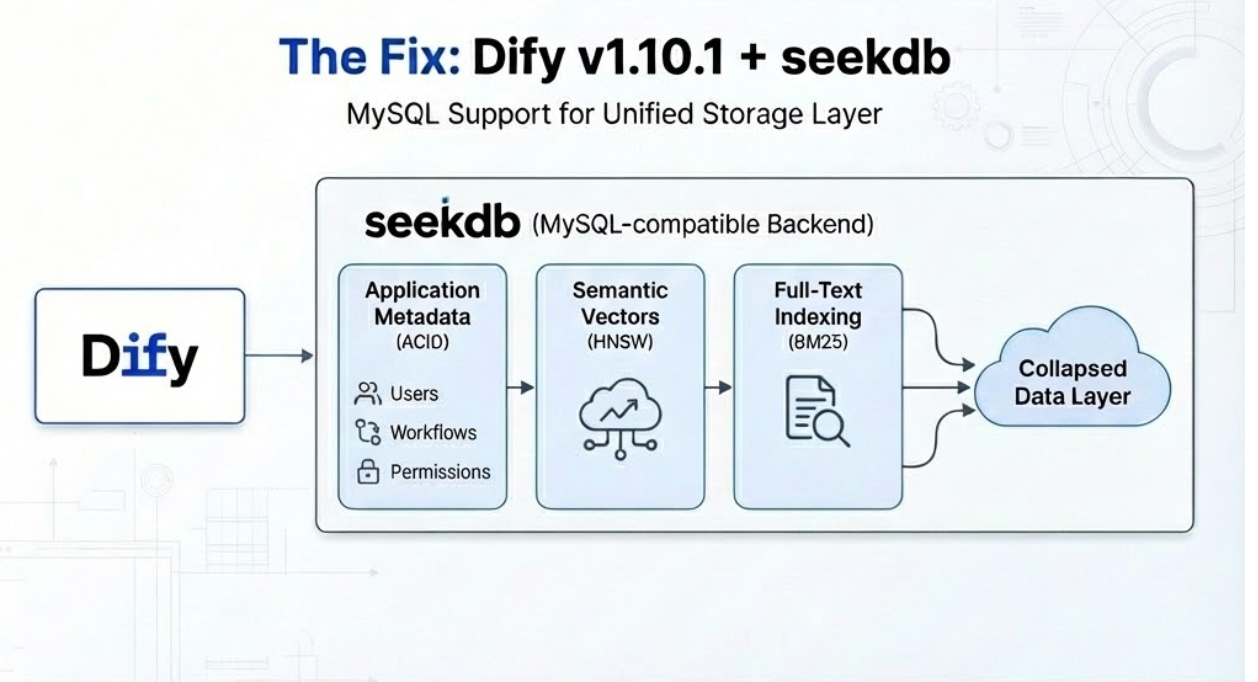
- What Dify sees: A standard, MySQL-compatible database.
- What seekdb does:Stores Application Metadata: (Users, Workflows, Permissions) with ACID compliance.Indexes Vectors: (HNSW) for semantic context.Builds Inverted Indexes: (BM25) for keyword search.
Hands-On: The 5-Minute Migration
We can prove this simplification by spinning up a local Dify instance that uses only seekdb, eliminating the usual Postgres/Weaviate/Redis sidecars.
Before you begin, ensure your environment meets the following requirements:
- Container Runtime: Docker & Docker Compose
- Git: The version control tool
1. Prepare the environment Clone the Dify repository and switch to the docker directory.
git clone https://github.com/langgenius/dify.git
cd dify/docker
2. Configure the Unified Backend Edit your .env file. We will point all three logic stores to the single seekdb container.
# In your .env file:

# 1. Application Metadata (SQL) -> Routes to seekdb
DB_TYPE=mysql  # Switches Dify's ORM to MySQL mode.
DB_HOST=seekdb # Offloads vector search to seekdb.
DB_DATABASE=dify # Uses seekdb's inverted indexes for keyword search.

# 2. Vector Search (Dense) -> Routes to seekdb
VECTOR_STORE=oceanbase
OCEANBASE_VECTOR_HOST=seekdb
OCEANBASE_VECTOR_PORT=2881
OCEANBASE_VECTOR_USER=root@test
OCEANBASE_VECTOR_DATABASE=dify

# 3. Keyword Search (Sparse) -> Routes to seekdb
KEYWORD_STORE=oceanbase
3. Spin up the stack.
docker compose up -d4. Verify the migration.
- First, check that the containers are running. You should see all services in a healthy state:docker ps
- The system will automatically initialize and migrate the Dify metadata database upon startup. This process typically takes 1 to 2 minutes. To confirm the migration, check the logs of the following three containers.
docker logs -f docker-api-1
docker logs -f docker-worker-1
docker logs -f docker-worker_beat-1
Sample output:
Look for the Database migration successful keyword in any of the container logs. The other two containers may show Database migration skipped. This is normal behavior.
You can now access the Dify UI, create knowledge bases, import documents, and perform RAG retrieval—all backed by a single, unified engine.
What You Just Eliminated
By switching to this architecture, look at the work you don't have to do:
- No Data Sync Logic: You don't need to write code to ensure your Vector DB is in sync with your Relational DB. The database handles consistency.
- No Glue Code: You don't need to write manual re-ranking logic. Dify pushes the query to seekdb, and seekdb handles the hybrid ranking.
- No Ops Sprawl: You monitor one database, back up one database, and scale one database.
The result? You stop debugging synchronization scripts and start focusing on what matters: designing better Agents and workflows.
Build your own agent using Dify + seekDB now
- Try it: Dify on MySQL
- Star the project: seekdb repo